Templates · Onboarding screens · Travel app · Nomad
Nomad How it works screen
An onboarding screen from Nomad, a travel eSIM data plans app template in a Glass style. Screen 2 of 25.
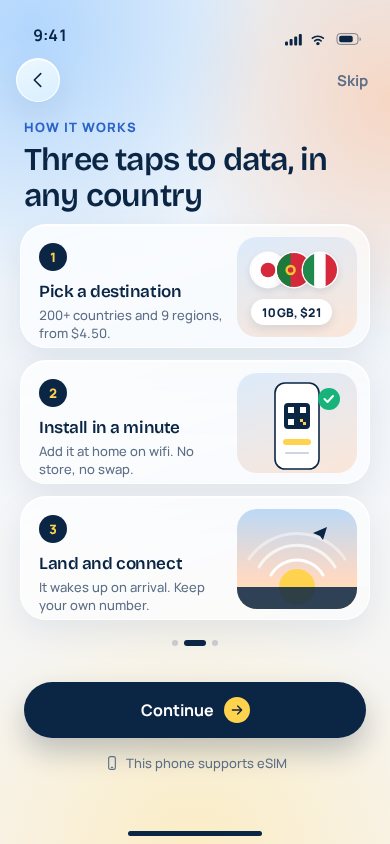
Nomad is a complete travel eSIM app: welcome, how it works, sign in and an email code, an explore home with your live eSIM and popular countries, search, regional and global plans, a country with data packages, package detail with networks, regional coverage, checkout with credits, a purchase receipt, an install guide, a QR code with manual codes, live install progress, data roaming setup, my eSIMs, a data dashboard with daily usage, top up, invites, credits, the Nomad Pass plan, notifications, profile and settings. Sky to sand light with frosted glass, navy and a sun yellow accent.
| Detail | Value |
|---|---|
| Screen type | Onboarding |
| App | Nomad: Travel eSIM data plans |
| Category | Travel |
| Design language | Glass, light |
| Type | Bricolage Grotesque for headings, Manrope for text |
| Colours | #e7f1fa background, #ffffff surface, #0b2545 text, #5d6f86 text-muted, #0b2545 accent, #ffffff accent-contrast, #ffd34d secondary, #2a63c9 link, #17b37b success, #dfe6ef border, #f0565c danger |
What this screen says
- Skip
- How it works
- Three taps to data, in any country
- Pick a destination
- 200+ countries and 9 regions, from $4.50.
- 10 GB, $21
- Install in a minute
- Add it at home on wifi. No store, no swap.
- Land and connect
- It wakes up on arrival. Keep your own number.
- Continue
- This phone supports eSIM
Around it in Nomad
More onboarding screens
- Aloft Welcome: Flight tracker
- Pitch Welcome: Campsite booking and trip kit
- Hail Welcome: Ride hailing
- Volta Welcome: EV charging
- Museo Welcome: Museum guide
- Roamly Welcome: Trips, stays and experiences
- Jaunt Welcome: Bus, train and flight booking
- Spoke Welcome: Bike sharing
- Navara Welcome: Yacht charter
- Voya Welcome: Travel booking
- Wheelhouse Welcome: Driver app for ride hailing
- Fuelup Welcome: Pay at the pump and car wash
Every travel app onboarding screen
What makes a good onboarding screen
- One idea per screen. Each screen should say one thing in a headline people can read in a second. If a screen needs a paragraph, it is doing too much.
- Personalise with a purpose. Ask a question only if the answer changes what people see next, like a goal, a level or an interest. Then show that the answer mattered.
- Explain permissions before asking. Show your own screen saying why you need notifications, location or the camera before the system prompt. People who understand the reason are more likely to allow it.
- Let people skip. A visible skip or "I'll do this later" respects returning users and the impatient. Make sure skipping still lands them somewhere useful.
The full onboarding screen guide and every example
Remix Nomad free: describe your own app and it is drawn in this design. Or get its files from $10: Figma, React Native, SwiftUI, Flutter and HTML.