Templates · React Native templates · Travel · Nomad
Nomad React Native template: travel eSIM data plans app in Expo
Nomad is a travel eSIM data plans app design in a Glass style, and its React Native download is a working Expo project: all 25 screens as routes, linked the way the prototype is, with the palette in one colours file. A complete travel eSIM app: welcome, how it works, sign in and an email code, an explore home with your live eSIM and popular countries, search, regional and global plans, a country with data packages, package detail with networks, regional coverage, checkout with credits, a purchase receipt, an install guide, a QR code with manual codes, live install progress, data roaming setup, my eSIMs, a data dashboard with daily usage, top up, invites, credits, the Nomad Pass plan, notifications, profile and settings. Sky to sand light with frosted glass, navy and a sun yellow accent.
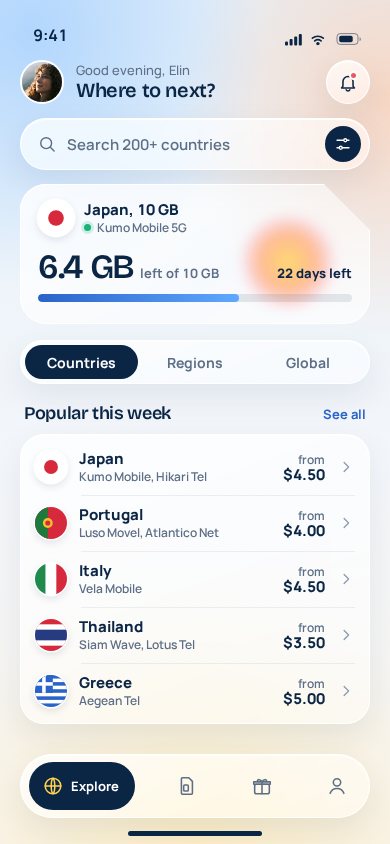
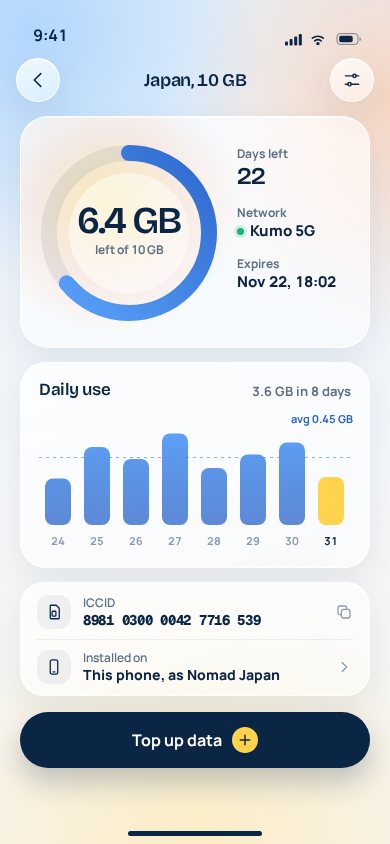
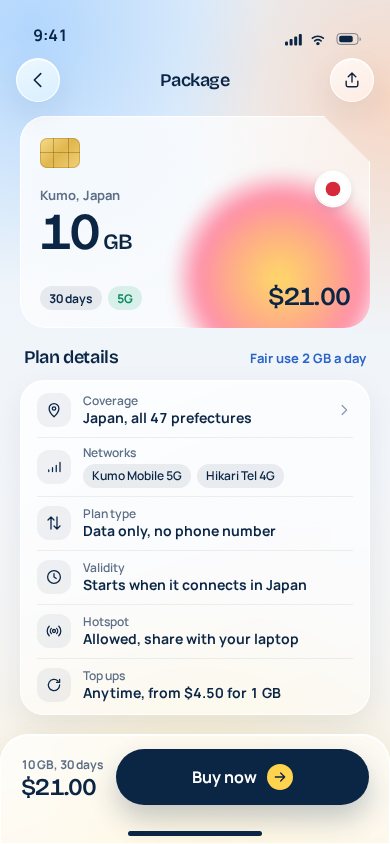
25 screens · Glass · Light · Travel
The Expo project
An Expo Router project on Expo SDK 58, in TypeScript. Every file name below comes from a screen in Nomad:
nomad/  # The project root
  src/
    app/  # Expo Router: one file per route
      _layout.tsx  # The stack navigator, with the fonts loaded
      index.tsx  # Opens on Welcome
      welcome.tsx  # Welcome (Onboarding)
      how-it-works.tsx  # How it works (Onboarding)
      sign-in.tsx  # Sign in (Sign in)
      verify-email.tsx  # Verify email (Sign in)
      explore.tsx  # Explore (Home)
      search.tsx  # Search (Search)
      regions.tsx  # Regions (List)
      country.tsx  # Country (Detail)
      package.tsx  # Package (Detail)
      coverage.tsx  # Coverage (Detail)
      checkout.tsx  # Checkout (Checkout)
      purchase-complete.tsx  # Purchase complete (Success)
      install-guide.tsx  # Install guide (List)
      qr-code.tsx  # QR code (Media)
      installing.tsx  # Installing (Tracking)
      turn-on-data.tsx  # Turn on data (Form)
      my-e-sims.tsx  # My eSIMs (List)
      e-sim.tsx  # eSIM (Dashboard)
      top-up.tsx  # Top up (Form)
      invite-friends.tsx  # Invite friends (List)
      credits.tsx  # Credits (List)
      nomad-pass.tsx  # Nomad Pass (Paywall)
      notifications.tsx  # Notifications (List)
      profile.tsx  # Profile (Profile)
      settings.tsx  # Settings (Settings)
    components/
      icons.tsx  # Every icon the screens use, as a component
    theme/
      colors.ts  # The palette by role
  assets/images/  # The photos
  app.json  # App name, scheme and splash
  package.json  # Expo SDK 58, Expo Router, fonts from @expo-google-fonts
  README.md  # How to run it and what is where
How to run it
- Get the template. Buy Nomad (files from $10, every format included), use a free download from a paid plan, or open it with a Template Pass.
- Download and install. Download the React Native zip, unpack it and run npm install in the folder. You need Node.js 20 or newer.
- Run it. Run npx expo start, then open it in Expo Go on your phone, or press i for the iOS simulator or a for the Android emulator.
- Make it yours. Change src/theme/colors.ts to recolour every screen at once, replace the sample content in each route, and add your data and backend.
npm install
npx expo start
What works on download
- Native components. Every screen is built from React Native views, text, images and SVG icons: no web views, no screenshots.
- Navigation. Wired between screens with Expo Router, following the links in the template's prototype: buttons and tabs go where they should.
- Theme. The palette lives in src/theme/colors.ts by role, and each screen keeps plain StyleSheet styles beside it: no styling library to set up.
What is yours to wire up
- Data. Lists, prices and profiles are static sample content from the template. Swap them for your own state or API calls.
- Backend. There is no backend, sign in or payments code. Forms and buttons are interface only, ready for your logic.
- Store setup. App icon, splash screen, bundle id and store listing are yours to set in app.json before you ship.
The 25 screens
| Screen | Screen type | Route file |
|---|---|---|
| Welcome | Onboarding | src/app/welcome.tsx |
| How it works | Onboarding | src/app/how-it-works.tsx |
| Sign in | Sign in | src/app/sign-in.tsx |
| Verify email | Sign in | src/app/verify-email.tsx |
| Explore | Home | src/app/explore.tsx |
| Search | Search | src/app/search.tsx |
| Regions | List | src/app/regions.tsx |
| Country | Detail | src/app/country.tsx |
| Package | Detail | src/app/package.tsx |
| Coverage | Detail | src/app/coverage.tsx |
| Checkout | Checkout | src/app/checkout.tsx |
| Purchase complete | Success | src/app/purchase-complete.tsx |
| Install guide | List | src/app/install-guide.tsx |
| QR code | Media | src/app/qr-code.tsx |
| Installing | Tracking | src/app/installing.tsx |
| Turn on data | Form | src/app/turn-on-data.tsx |
| My eSIMs | List | src/app/my-e-sims.tsx |
| eSIM | Dashboard | src/app/e-sim.tsx |
| Top up | Form | src/app/top-up.tsx |
| Invite friends | List | src/app/invite-friends.tsx |
| Credits | List | src/app/credits.tsx |
| Nomad Pass | Paywall | src/app/nomad-pass.tsx |
| Notifications | List | src/app/notifications.tsx |
| Profile | Profile | src/app/profile.tsx |
| Settings | Settings | src/app/settings.tsx |
The design
Bright travel glass: a page that fades from pale sky (#e7f1fa) to warm sand (#f8f4ee) with three soft blurred glows, sky blue top left, peach top right and sunlight at the bottom. Every surface is frosted white glass: a white to translucent white gradient, a 1px white border, an inset top highlight, a 20px backdrop blur and a soft navy shadow. Deep navy (#0b2545) carries the text, primary buttons, the active tab and hero panels; sun yellow (#ffd34d) is the single accent for icon discs, highlights and the active tab icon; link blue (#2a63c9) for data bars and links; green (#17b37b) for connected and 5G. Countries are round flag discs with a white ring. The signature is the eSIM card: frosted glass with the top right corner clipped at 45 degrees, a gold contact chip and a blurred sunset coloured horizon sun behind the destination. Headings and big numbers are Bricolage Grotesque semibold with tight tracking; codes and ICCIDs in Geist Mono. Headings in Bricolage Grotesque, body text in Manrope.
| Colour | Role |
|---|---|
| #e7f1fa | background |
| #ffffff | surface |
| #0b2545 | text |
| #5d6f86 | text-muted |
| #0b2545 | accent |
| #ffffff | accent-contrast |
| #ffd34d | secondary |
| #2a63c9 | link |
| #17b37b | success |
| #dfe6ef | border |
| #f0565c | danger |
Get the files
Remixing Nomad is free. To get the template itself, the files are from $10, and one price unlocks every format:
- Figma. Every screen as editable layers: named frames, text, vectors and photos, with colour and text styles.
- React Native (Expo). An Expo Router project with every screen, the navigation between them, the theme and the icons.
- SwiftUI. An Xcode project for iOS 17 with a SwiftUI view per screen, fonts and assets.
- Flutter. A Flutter app with go_router, a widget per screen, fonts and assets.
- HTML. Each screen as a standalone HTML file with its fonts and photos, plus the design tokens as CSS and JSON.
Get the Nomad files · Nomad in Figma · Nomad in React Native · Every template with a Template Pass ($49 for a year)
Nomad in other formats
- Nomad Figma template
- Nomad in SwiftUI (in the same purchase)
- Nomad in Flutter (in the same purchase)
- See every Nomad screen and remix it free
More travel React Native templates
- Atlas: Maps and navigation
- Kerb: Parking that reads like a road sign
- Linea: City transit
- Hollow: Cabin and boutique stays
- Aloft: Flight tracker
- Pitch: Campsite booking and trip kit
- Travel app templates
- All React Native templates
Questions people ask
- What do I need installed?
- Node.js 20 or newer and npm. To see it on a phone, install Expo Go; for simulators, Xcode (iOS, on a Mac) or Android Studio. No Expo account is needed to run it.
- Which Expo version is it?
- Expo SDK 58 (React Native 0.88, new architecture) with Expo Router, TypeScript throughout. Each screen is a route file in src/app, named after the screen.
- Does the same purchase include Figma and Swift?
- Yes. One price unlocks every format of Nomad: Figma, React Native (Expo), SwiftUI, Flutter and HTML. A Template Pass ($49 for a year) unlocks every template.
- Can I use the Nomad template commercially?
- Yes. You can build and ship commercial apps with it, for yourself or for clients, as many as you like. What you cannot do is resell or give away the template files themselves, as a template or a UI kit. The photos are free-licence stock used as placeholders: swap in your own before launch.
- Do I get updates?
- Yes, free. You buy the template, not a version: every download builds from the latest Nomad design, and your library flags a template that changed since you last downloaded it.
- Is a backend included?
- No. The download is the interface: screens, navigation, styles and assets. There is no server, database, sign in, payments or API code, and the content on each screen is static sample data for you to replace.
- What is the difference between buying and remixing?
- Remixing is free: you describe your own app and it is drawn in Nomad's design, in the DraftScreens studio. Buying gets you Nomad itself as files, from $10, in Figma, React Native (Expo), SwiftUI, Flutter and HTML.