Templates · Onboarding screens · Travel app · Museo
Museo Welcome screen
An onboarding screen from Museo, a museum guide app template in a Brutalist style. Screen 1 of 25.
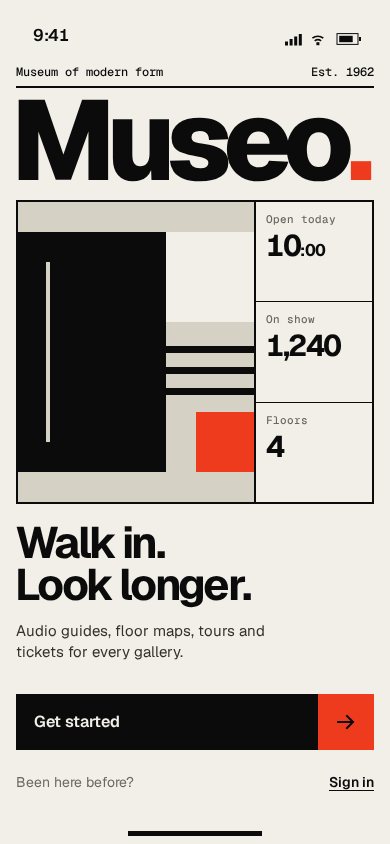
Museo is a complete museum guide: welcome, sign in, create account and a code, today at the museum, notifications, exhibitions and one in full, an artwork page, an audio guide player, a floor map with a route to a gallery, tours and booking, timed tickets with checkout and a ticket to scan, collection search, favourites, a record of your visits, membership, profile and settings. Everything sits on a ruled grid in black on paper, with vermilion kept for what is live, selected or yours.
| Detail | Value |
|---|---|
| Screen type | Onboarding |
| App | Museo: Museum guide |
| Category | Travel |
| Design language | Brutalist, light |
| Type | Geist |
| Colours | #f1efe8 background, #faf9f5 surface, #0b0b0b text, #6b6860 text-muted, #ef3b1d accent, #0b0b0b accent-contrast, #d5d1c5 secondary, #0b0b0b border, #c22a10 danger |
What this screen says
- Museum of modern form Est. 1962
- Museo.
- Open today10:00
- On show1,240
- Floors4
- Walk in.
- Look longer.
- Audio guides, floor maps, tours and tickets for every gallery.
- Get started
- Been here before? Sign in
Around it in Museo
More onboarding screens
- Kerb Welcome: Parking that reads like a road sign
- Linea Welcome: City transit
- Hollow Welcome: Cabin and boutique stays
- Aloft Welcome: Flight tracker
- Pitch Welcome: Campsite booking and trip kit
- Hail Welcome: Ride hailing
- Volta Welcome: EV charging
- Roamly Welcome: Trips, stays and experiences
- Jaunt Welcome: Bus, train and flight booking
- Spoke Welcome: Bike sharing
- Navara Welcome: Yacht charter
- Voya Welcome: Travel booking
Every travel app onboarding screen
What makes a good onboarding screen
- One idea per screen. Each screen should say one thing in a headline people can read in a second. If a screen needs a paragraph, it is doing too much.
- Personalise with a purpose. Ask a question only if the answer changes what people see next, like a goal, a level or an interest. Then show that the answer mattered.
- Explain permissions before asking. Show your own screen saying why you need notifications, location or the camera before the system prompt. People who understand the reason are more likely to allow it.
- Let people skip. A visible skip or "I'll do this later" respects returning users and the impatient. Make sure skipping still lands them somewhere useful.
The full onboarding screen guide and every example
Remix Museo free: describe your own app and it is drawn in this design. Or get its files from $10: Figma, React Native, SwiftUI, Flutter and HTML.