Templates · Sign in and sign up screens · Fitness app · Nightly
Nightly Sign in screen
A sign in screen from Nightly, a smart ring sleep and readiness app template in a Dark-first style. Screen 3 of 25.
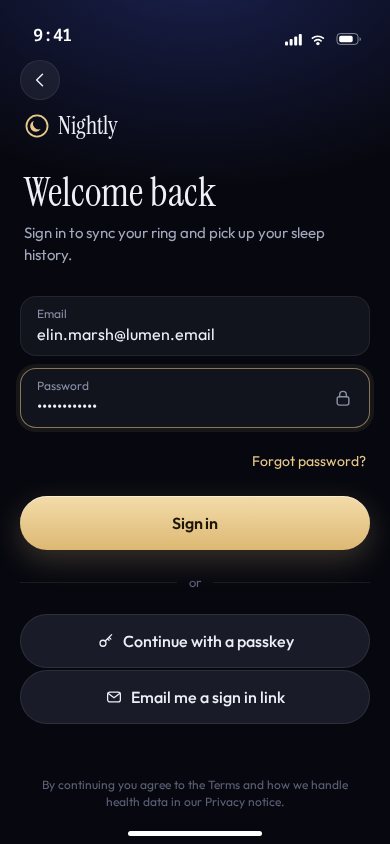
Nightly is a complete smart ring companion: welcome, ring pairing and sign in, a Today home with three halo scores, readiness with its contributors, last night's sleep with a hypnogram and stages, overnight heart rate and HRV, body temperature, an ideal bedtime window, tags, activity, a live workout and its summary, daytime stress, 30 day trends, a journal, guided sessions with a breathing player, circles of friends, notifications, a membership with checkout, the ring itself, profile and settings. Night navy and ink with champagne gold, periwinkle and sage.
| Detail | Value |
|---|---|
| Screen type | Sign in |
| App | Nightly: Smart ring sleep and readiness |
| Category | Health and fitness |
| Design language | Dark-first, dark |
| Type | Instrument Serif for headings, Outfit for text |
| Colours | #07080f background, #11131d surface, #eef0f7 text, #8a90a6 text-muted, #e9c98b accent, #1c1508 accent-contrast, #8e9cff secondary, #22263a border, #ff7a6b danger |
What this screen says
- Nightly
- Welcome back
- Sign in to sync your ring and pick up your sleep history.
- elin.marsh@lumen.email
- Password
- ••••••••••••
- Forgot password?
- Sign in
- or
- Continue with a passkey
- Email me a sign in link
- By continuing you agree to the Terms and how we handle health data in our Privacy notice.
Around it in Nightly
More sign in and sign up screens
- Donor Sign in: Blood donation, counted drop by drop
- Unfold Sign in: Yoga and stretching
- Kilo Sign in: Strength training log
- Cyra Sign in: Cycle tracker
- Harbor Sign in: Therapy and mood
- Fasten Sign in: Intermittent fasting
- Plate Sign in: Calorie and macro tracker
- Vita Sign in: Personal health record
- Forge Sign in: AI fitness and nutrition
- Lull Sign in: Sleep sounds and meditation
- Pace Sign in: Fitness tracker
- Flexpass Sign in: One membership, many studios
Every fitness app sign in screen
What makes a good login screen
- Offer the fastest option first. Sign in with Apple, Google or a passkey takes one tap. If you support them, put them above the email form. Apple asks apps that use a third-party login like Google to also offer an equivalent privacy-focused option, such as Sign in with Apple.
- Separate sign in from sign up clearly. Use different headings and buttons, and a clear link to switch. People who already have an account should never end up creating a second one by accident.
- Use the right keyboard and autofill. Email fields should open the email keyboard and support password managers and one-time code autofill. Small details, big difference in how many people get through.
- Write errors that help. "That password doesn't match this email" is better than "Error 401". Keep what people typed so they only fix the part that was wrong.
The full login screen guide and every example
Remix Nightly free: describe your own app and it is drawn in this design. Or get its files from $10: Figma, React Native, SwiftUI, Flutter and HTML.