Templates · Sign in and sign up screens · Fitness app · Cyra
Cyra Sign in screen
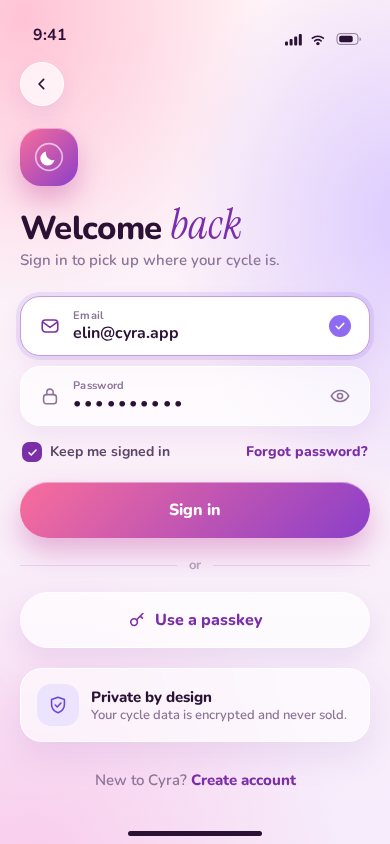
A sign in screen from Cyra, a cycle tracker app template in a Glass style. Screen 2 of 25.
Cyra is a complete cycle tracker: welcome, sign in, first cycle setup, a today screen with a cycle ring dial, logging flow, mood and symptoms, a calendar with period and fertile days, day detail, predictions, the fertile window, insights, cycle history, symptom patterns, a phase guide, temperature charting, a health report for a doctor, partner sharing, reminders, a Plus plan, profile and settings. Rose marks the period, violet the fertile window and a gold full moon marks ovulation.
| Detail | Value |
|---|---|
| Screen type | Sign in |
| App | Cyra: Cycle tracker |
| Category | Health and fitness |
| Design language | Glass, light |
| Type | Nunito |
| Colours | #fdeef3 background, #ffffff surface, #2b1235 text, #8d7598 text-muted, #f0568a accent, #ffffff accent-contrast, #7a2fa8 secondary, #ecdcef border, #d9364f danger |
What this screen says
- Welcome back
- Sign in to pick up where your cycle is.
- elin@cyra.app
- Password
- ••••••••••
- Keep me signed in Forgot password?
- Sign in
- or
- Use a passkey
- Private by design
- Your cycle data is encrypted and never sold.
- New to Cyra? Create account
Around it in Cyra
More sign in and sign up screens
- Vantage Sign in: Sports watch companion
- Labwork Sign in: Book blood tests and see results
- Segment Sign in: Runs and rides with friends
- Nightly Sign in: Smart ring sleep and readiness
- Pillbox Sign in: Pharmacy refills and medicine reminders
- Rise Sign in: Alarm clock and sleep cycles
- Ward Sign in: Patient portal for results, visits and messages
- Level Sign in: Glucose monitor companion
- Reformer Sign in: Pilates studio booking
- Sip Sign in: Water intake and hydration
- Mend Sign in: Physio and rehab exercises
- Tabata Sign in: HIIT interval timer
Every fitness app sign in screen
What makes a good login screen
- Offer the fastest option first. Sign in with Apple, Google or a passkey takes one tap. If you support them, put them above the email form. Apple asks apps that use a third-party login like Google to also offer an equivalent privacy-focused option, such as Sign in with Apple.
- Separate sign in from sign up clearly. Use different headings and buttons, and a clear link to switch. People who already have an account should never end up creating a second one by accident.
- Use the right keyboard and autofill. Email fields should open the email keyboard and support password managers and one-time code autofill. Small details, big difference in how many people get through.
- Write errors that help. "That password doesn't match this email" is better than "Error 401". Keep what people typed so they only fix the part that was wrong.
The full login screen guide and every example
Remix Cyra free: describe your own app and it is drawn in this design. Or get its files from $10: Figma, React Native, SwiftUI, Flutter and HTML.