Templates · Onboarding screens · Travel app · Navara
Navara Preferences screen
An onboarding screen from Navara, a yacht charter app template in a Luxury style. Screen 2 of 14.
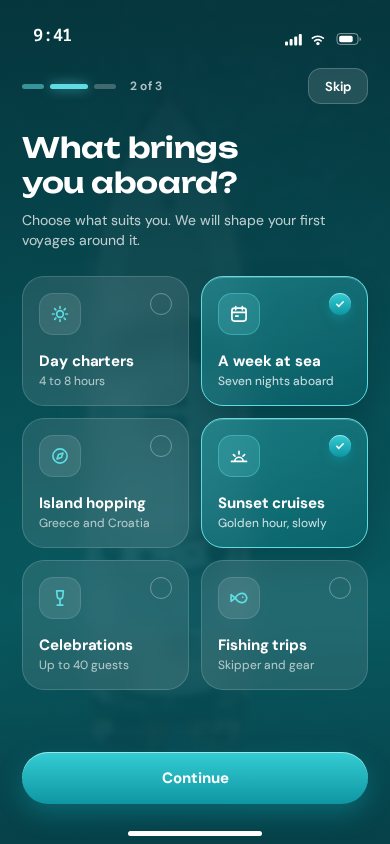
Navara is a complete luxury charter app: onboarding, sign in, a photo-led home, search, yacht detail, booking, checkout, a membership paywall, trips, profile and settings. Deep teal photography under frosted glass panels, with wide display type and one bright teal action.
| Detail | Value |
|---|---|
| Screen type | Onboarding |
| App | Navara: Yacht charter |
| Category | Travel |
| Design language | Luxury, dark |
| Type | Unbounded for headings, DM Sans for text |
| Colours | #06454d background, #1d2b30 surface, #ffffff text, #b9d9dc text-muted, #17b6c0 accent, #ffffff accent-contrast, #eafcfc secondary, #3a555c border |
What this screen says
- 2 of 3
- Skip
- What brings
- you aboard?
- Choose what suits you. We will shape your first voyages around it.
- Day charters
- 4 to 8 hours
- A week at sea
- Seven nights aboard
- Island hopping
- Greece and Croatia
- Sunset cruises
- Golden hour, slowly
- Celebrations
- Up to 40 guests
- Fishing trips
- Skipper and gear
- Continue
Around it in Navara
More onboarding screens
- Nomad Welcome: Travel eSIM data plans
- Tern Welcome: Ferry and island hopping
- Berth Welcome: Night trains and sleeper cabins
- Caravan Welcome: Campervan rental and road trips
- Layover Welcome: Airport guide, gates and lounges
- Permit Welcome: Visas and travel documents wallet
- Backroad Welcome: Road trip planner with stops
- Bunk Welcome: Hostels and backpacker meetups
- Piazza Welcome: Self-guided city walking tours
- Fjord Welcome: Cruise companion on board
- Atlas Welcome: Maps and navigation
- Kerb Welcome: Parking that reads like a road sign
Every travel app onboarding screen
What makes a good onboarding screen
- One idea per screen. Each screen should say one thing in a headline people can read in a second. If a screen needs a paragraph, it is doing too much.
- Personalise with a purpose. Ask a question only if the answer changes what people see next, like a goal, a level or an interest. Then show that the answer mattered.
- Explain permissions before asking. Show your own screen saying why you need notifications, location or the camera before the system prompt. People who understand the reason are more likely to allow it.
- Let people skip. A visible skip or "I'll do this later" respects returning users and the impatient. Make sure skipping still lands them somewhere useful.
The full onboarding screen guide and every example
Remix Navara free: describe your own app and it is drawn in this design. Or get its files from $10: Figma, React Native, SwiftUI, Flutter and HTML.