Templates · Onboarding screens · Travel app · Backroad
Backroad Welcome screen
An onboarding screen from Backroad, a road trip planner with stops app template in a Neubrutalism style. Screen 1 of 25.
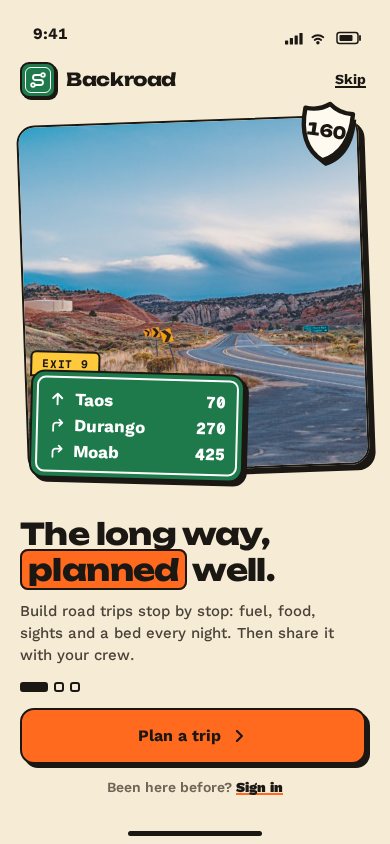
Backroad is a complete road trip planner: welcome, travel style, sign in, a home with tomorrow's drive, trips, a trip map, a day by day itinerary on a road ribbon, stops along the route, search, a stop, adding a stop and a new trip, the shared budget, road stats, booking a motel with review and a confirmation key tag, live drive mode, a postcard maker, the crew, a packing list, notifications, Backroad Plus, profile and settings. Sand and cream with ink outlines, cone orange, highway green and a dashed yellow centre line.
| Detail | Value |
|---|---|
| Screen type | Onboarding |
| App | Backroad: Road trip planner with stops |
| Category | Travel |
| Design language | Neubrutalism, light |
| Type | Unbounded for headings, Work Sans for text |
| Colours | #f6ecd6 background, #fffaf0 surface, #1b1814 text, #6f6556 text-muted, #ff6a1f accent, #1b1814 accent-contrast, #1e7a4a secondary, #1b1814 border, #e0392b danger |
What this screen says
- Backroad
- Skip
- EXIT 9
- Taos 70
- Durango 270
- Moab 425
- The long way, planned well.
- Build road trips stop by stop: fuel, food, sights and a bed every night. Then share it with your crew.
- Plan a trip
- Been here before? Sign in
Around it in Backroad
More onboarding screens
- Caravan Welcome: Campervan rental and road trips
- Layover Welcome: Airport guide, gates and lounges
- Permit Welcome: Visas and travel documents wallet
- Bunk Welcome: Hostels and backpacker meetups
- Piazza Welcome: Self-guided city walking tours
- Fjord Welcome: Cruise companion on board
- Atlas Welcome: Maps and navigation
- Kerb Welcome: Parking that reads like a road sign
- Linea Welcome: City transit
- Hollow Welcome: Cabin and boutique stays
- Aloft Welcome: Flight tracker
- Pitch Welcome: Campsite booking and trip kit
Every travel app onboarding screen
What makes a good onboarding screen
- One idea per screen. Each screen should say one thing in a headline people can read in a second. If a screen needs a paragraph, it is doing too much.
- Personalise with a purpose. Ask a question only if the answer changes what people see next, like a goal, a level or an interest. Then show that the answer mattered.
- Explain permissions before asking. Show your own screen saying why you need notifications, location or the camera before the system prompt. People who understand the reason are more likely to allow it.
- Let people skip. A visible skip or "I'll do this later" respects returning users and the impatient. Make sure skipping still lands them somewhere useful.
The full onboarding screen guide and every example
Remix Backroad free: describe your own app and it is drawn in this design. Or get its files from $10: Figma, React Native, SwiftUI, Flutter and HTML.