Templates · Form and input screens · Social app · Natter
Natter New community screen
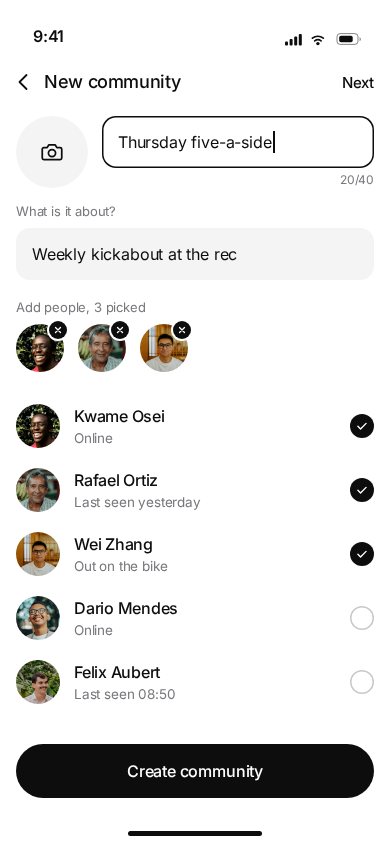
A form screen from Natter, a minimal messenger app template in a Minimal style. Screen 8 of 25.
Natter is a complete messenger on pure white: welcome, phone sign in and a code, a chat list under a row of stories, a start new sheet, new chat, new contact and new community, a conversation with a message action sheet (react, copy, reply, forward, delete), forwarding, stories, search, communities, calls, contacts, notifications, a weekly activity summary, a Plus plan, profile and settings. One warm yellow marks what is yours or unread, everything else is black, white and pale grey.
| Detail | Value |
|---|---|
| Screen type | Form |
| App | Natter: Minimal messenger |
| Category | Social |
| Design language | Minimal, light |
| Type | Inter |
| Colours | #ffffff background, #f4f4f5 surface, #0d0d0d text, #77777c text-muted, #f6c81e accent, #0d0d0d accent-contrast, #0d0d0d secondary, #ededee border, #e5484d danger |
What this screen says
- New community
- Next
- Thursday five-a-side
- What is it about?
- Weekly kickabout at the rec
- Add people, 3 picked
- Kwame Osei
- Online
- Rafael Ortiz
- Last seen yesterday
- Wei Zhang
- Out on the bike
- Dario Mendes
- Felix Aubert
- Last seen 08:50
- Create community
Around it in Natter
More form and input screens
- Carrier New channel: Cloud messaging with channels
- Vista New post: Photos, stories and reels
- Flick Share: Short video feed
- Squawk Compose: Short posts and live conversation
- Agora Reply: Communities, threads and votes
- Spark About you: Swipe dating
- Candid Review: One real photo a day
- Blink Send to: Camera chat and stories
- Cipher Disappearing messages: Encrypted private messenger
- Commons New post: Friends, groups and events
- Tether Join circle: Family location and safety
- Facet Call link: Video calls with family and friends
What makes a good form screen
- Ask only what you need. Every field is a reason to stop. Remove optional fields or move them to later.
- Labels above fields. Visible labels stay readable while people type; placeholder-only labels disappear.
- Use the right keyboard and input. Number pads for amounts, email keyboards for email, pickers for dates and autofill for addresses and codes.
- Validate as people go. Show problems next to the field when people leave it, in words that say how to fix them.
The full form screen guide and every example
Remix Natter free: describe your own app and it is drawn in this design. Or get its files from $10: Figma, React Native, SwiftUI, Flutter and HTML.