Templates · Detail screens · Lifestyle app · Natal
Natal Placement screen
A detail screen from Natal, a birth charts and daily astrology app template in a Luxury style. Screen 6 of 25.
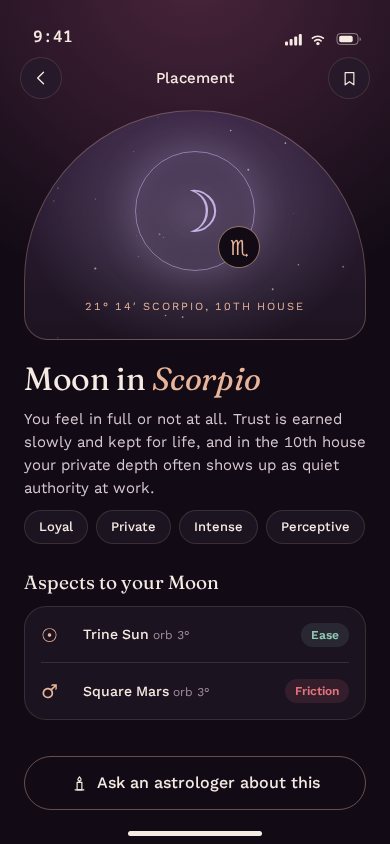
Natal is a complete astrology app: welcome, birth details and sign in, a daily reading with the moon and today's transits, a full birth chart wheel, a placement page, an aspect grid, transits and a transit page, a cosmic calendar, a live moon tracker, friends and a synastry match, a journal with a new entry and mood patterns against the moon, a marketplace of astrologers with a profile, booking, confirmation and a live video reading, a Luminary plan, notifications, profile and settings. Aubergine and rosé copper with lilac moonlight.
| Detail | Value |
|---|---|
| Screen type | Detail |
| App | Natal: Birth charts and daily astrology |
| Category | Lifestyle |
| Design language | Luxury, dark |
| Type | Fraunces for headings, Work Sans for text |
| Colours | #120b16 background, #1c1320 surface, #f5ebe3 text, #a3929d text-muted, #e8b49a accent, #2a1216 accent-contrast, #c3b1e1 secondary, #3a2a38 border, #e5737c danger |
What this screen says
- Placement
- ☽︎♏︎
- 21° 14′ Scorpio, 10th house
- Moon in Scorpio
- You feel in full or not at all. Trust is earned slowly and kept for life, and in the 10th house your private depth...
- Loyal Private Intense Perceptive
- Aspects to your Moon
- ☉︎
- Trine Sun orb 3°
- Ease
- ♂︎
- Square Mars orb 3°
- Friction
- Ask an astrologer about this
Around it in Natal
More detail screens
- Tasker Furniture assembly: Book and do local odd jobs
- Toolbox Product: Hardware store and project lists
- Brief Full story: News in sixty words
- Kibble Product: Pet supplies and autoship
- Filmlog Film: Film diary and reviews
- Guardrail Child: Parental controls and screen time
- Collar Escape alert: GPS pet tracker
- Postage Item: Send parcels and find drop-off points
- Specs Frame: Glasses with virtual try-on
- Circuit Product: Electronics store with trade-in and repairs
- Provenance Item: Authenticated luxury resale
- Gavel Lot: Live online auctions
Every lifestyle app detail screen
What makes a good detail screen
- Lead with what identifies the item. A large image or title, the price or status, and the key facts at the top. People should know they are in the right place at a glance.
- Keep the main action visible. A sticky bottom button for Add to cart, Book or Play stays reachable while people scroll through details.
- Order information by importance. The facts that decide the choice come first; reviews, specifications and fine print further down.
- Use progressive disclosure. Long descriptions, specifications and policies can expand on tap rather than filling the screen.
The full detail screen guide and every example
Remix Natal free: describe your own app and it is drawn in this design. Or get its files from $10: Figma, React Native, SwiftUI, Flutter and HTML.