Templates · Booking and checkout screens · Smart home app · Mesh
Mesh Checkout screen
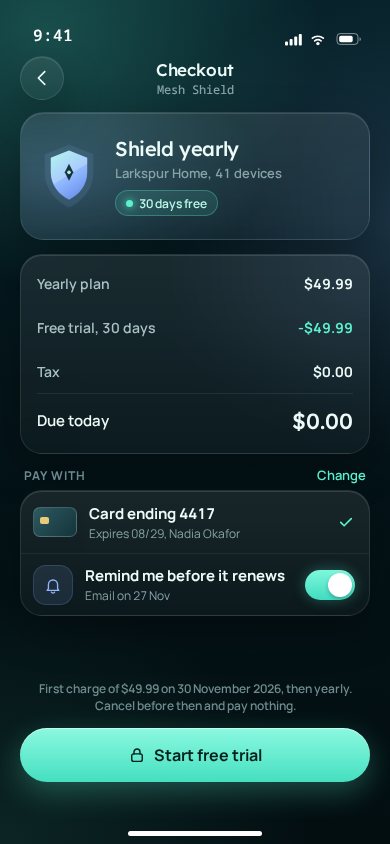
A checkout screen from Mesh, a home Wi-Fi network app template in a Glass style. Screen 22 of 25.
Mesh is a complete home Wi-Fi app: welcome, sign in and a code, a home with network health, a live topology map, node details, every connected device with usage, search, family profiles with pause and bedtime schedules, a guest network to share, a live speed test with history, security and ad blocking, adding a node with placement guidance, notifications, a Shield plan with checkout, account and settings. Deep petrol glass with aqua and ice blue.
| Detail | Value |
|---|---|
| Screen type | Checkout |
| App | Mesh: Home Wi-Fi network |
| Category | Smart home |
| Design language | Glass, dark |
| Type | Lexend for headings, Manrope for text |
| Colours | #041419 background, #12282e surface, #eefcf9 text, #86a3a6 text-muted, #5cf2cf accent, #03211c accent-contrast, #8fb6ff secondary, #22393e border, #ff7a85 danger |
What this screen says
- CheckoutMesh Shield
- Shield yearly
- Larkspur Home, 41 devices
- 30 days free
- Yearly plan$49.99
- Free trial, 30 days-$49.99
- Tax$0.00
- Due today$0.00
- Pay with
- Change
- Card ending 4417
- Expires 08/29, Nadia Okafor
- Remind me before it renews
- Email on 27 Nov
- First charge of $49.99 on 30 November 2026, then yearly. Cancel before then and pay nothing.
- Start free trial
Around it in Mesh
More booking and checkout screens
- Meter Review switch: Your energy supplier account
- Couch Rent: TV remote, casting and watchlist
- Latch Access window: Smart locks and guest access
- Nursery Start trial: Baby monitor camera and sleep
- Porch Confirm plan: Home security cameras
- Sundial Book visit: Solar panels and home battery
- Puddle Basket: Garden watering and sprinklers
- Upkeep Book: Home maintenance calendar
- Kelvin Book service: Climate and thermostat
- Glow Checkout: Light scenes and colour
- Tagged Review claim: Home inventory for insurance
- Lobby Book a slot: Apartment building app
Every smart home app checkout screen
What makes a good checkout screen
- Show the total early and honestly. Taxes, delivery and service fees should appear before the last step. A higher total on the final screen feels like a trick.
- Offer wallet payments. Apple Pay and Google Pay skip card typing entirely. Show them first when they are available.
- Ask for the minimum. Only the fields needed to deliver or book. Save details for next time.
- Let people review before paying. A clear summary of items, dates, address and price, with each part editable without starting over.
The full checkout screen guide and every example
Remix Mesh free: describe your own app and it is drawn in this design. Or get its files from $10: Figma, React Native, SwiftUI, Flutter and HTML.