Templates · Booking and checkout screens · Smart home app · Meter
Meter Review switch screen
A checkout screen from Meter, a smart home app template in a Clinical style. Screen 13 of 25.
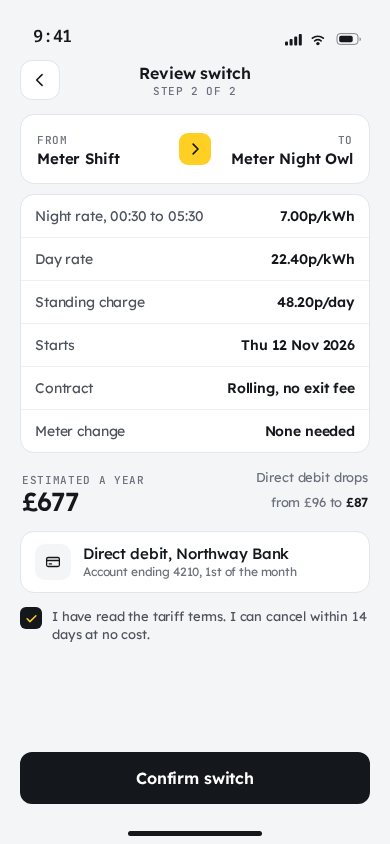
Meter is a complete energy supplier account: welcome and sign in, a home with the account balance, the next cheaper window and today's use, half-hourly smart meter usage, monthly insights, live usage, meter readings with a photo scan, confirm and sent, tariff details with unit rates, compare and switch tariff with review and confirmation, bills and a statement breakdown, balance, direct debit, cheaper time alerts, notifications, fault reporting with a live engineer visit, help, account and settings. Pale grey and white with graphite and signal yellow.
| Detail | Value |
|---|---|
| Screen type | Checkout |
| App | Meter: Your energy supplier account |
| Category | Smart home |
| Design language | Clinical, light |
| Type | JetBrains Mono for headings, Lexend for text |
| Colours | #f4f5f7 background, #ffffff surface, #14171c text, #6b717c text-muted, #ffcf24 accent, #14171c accent-contrast, #2f6bff secondary, #e2e5ea border, #e5484d danger |
What this screen says
- Review switchStep 2 of 2
- From Meter Shift
- To Meter Night Owl
- Night rate, 00:30 to 05:30
- 7.00p/kWh
- Day rate
- 22.40p/kWh
- Standing charge
- 48.20p/day
- Starts
- Thu 12 Nov 2026
- Contract
- Rolling, no exit fee
- Meter change
- None needed
- Estimated a year £677
- Direct debit drops
- from £96 to £87
- Direct debit, Northway BankAccount ending 4210, 1st of the month
- I have read the tariff terms. I can cancel within 14 days at no cost.
- Confirm switch
Around it in Meter
More booking and checkout screens
- Latch Access window: Smart locks and guest access
- Mesh Checkout: Home Wi-Fi network
- Nursery Start trial: Baby monitor camera and sleep
- Porch Confirm plan: Home security cameras
- Sundial Book visit: Solar panels and home battery
- Puddle Basket: Garden watering and sprinklers
- Upkeep Book: Home maintenance calendar
- Kelvin Book service: Climate and thermostat
- Glow Checkout: Light scenes and colour
- Tagged Review claim: Home inventory for insurance
- Lobby Book a slot: Apartment building app
- Sweep Cart: Robot vacuum and mop
Every smart home app checkout screen
What makes a good checkout screen
- Show the total early and honestly. Taxes, delivery and service fees should appear before the last step. A higher total on the final screen feels like a trick.
- Offer wallet payments. Apple Pay and Google Pay skip card typing entirely. Show them first when they are available.
- Ask for the minimum. Only the fields needed to deliver or book. Save details for next time.
- Let people review before paying. A clear summary of items, dates, address and price, with each part editable without starting over.
The full checkout screen guide and every example
Remix Meter free: describe your own app and it is drawn in this design. Or get its files from $10: Figma, React Native, SwiftUI, Flutter and HTML.