Templates · Booking and checkout screens · Food app · Picker
Picker Order review screen
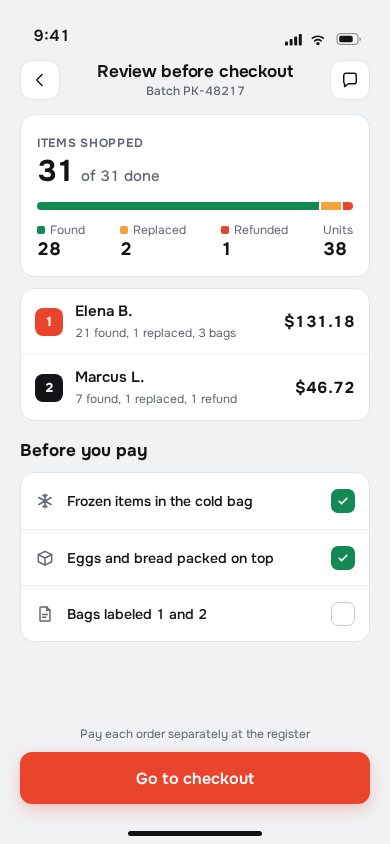
A checkout screen from Picker, a grocery shopper app template in an Enterprise style. Screen 12 of 25.
Picker is a complete shopper app for grocery delivery work: welcome, phone sign in and code, a batches home with live offers, a batch offer with route and pay, a shopping list grouped by aisle, item details, a barcode scanner, weighing produce, replacements and a chat with the customer, an order review, paying with the shopper card, snapping the receipt, live delivery on a map, drop off with a photo, batch complete, earnings, cash out, schedule, ratings, notifications, a priority plan, profile and settings. Ink, cool grey and white with tomato red and a found green.
| Detail | Value |
|---|---|
| Screen type | Checkout |
| App | Picker: Grocery shopper app |
| Category | Food |
| Design language | Enterprise, light |
| Type | JetBrains Mono for headings, Onest for text |
| Colours | #f1f2f4 background, #ffffff surface, #121417 text, #5f6672 text-muted, #e8452c accent, #ffffff accent-contrast, #138a54 secondary, #e1e4e9 border, #d6331b danger |
What this screen says
- Review before checkoutBatch PK-48217
- Items shopped
- 31of 31 done
- Found28
- Replaced2
- Refunded1
- Units38
- Elena B.
- 21 found, 1 replaced, 3 bags
- Marcus L.
- 7 found, 1 replaced, 1 refund
- Before you pay
- Frozen items in the cold bag
- Eggs and bread packed on top
- Bags labeled 1 and 2
- Pay each order separately at the register
- Go to checkout
Around it in Picker
More booking and checkout screens
- Courier Cash out: Food delivery driver app
- Queue Review: Join the waitlist from anywhere
- Nosh Reserve: Local restaurant reviews
- Buns Bag: Burger chain ordering and deals
- Slice Cart: Pizza ordering with a live tracker
- Crate Your box: Meal kits delivered weekly
- Dash Cart: Ten minute grocery delivery
- Aisle Add ingredients: Shared grocery lists
- Menu Table order: Scan, order and pay at the table
- Mart Scan basket: Supermarket app with loyalty and scan and go
- Rescue Reserve: Surprise bags of surplus food
- Omakase Choose seats: Chef's counter reservations
Every food app checkout screen
What makes a good checkout screen
- Show the total early and honestly. Taxes, delivery and service fees should appear before the last step. A higher total on the final screen feels like a trick.
- Offer wallet payments. Apple Pay and Google Pay skip card typing entirely. Show them first when they are available.
- Ask for the minimum. Only the fields needed to deliver or book. Save details for next time.
- Let people review before paying. A clear summary of items, dates, address and price, with each part editable without starting over.
The full checkout screen guide and every example
Remix Picker free: describe your own app and it is drawn in this design. Or get its files from $10: Figma, React Native, SwiftUI, Flutter and HTML.