Templates · Detail screens · Productivity app · Margin
Margin Answer screen
A detail screen from Margin, an AI note taking app template in a Dark-first style. Screen 17 of 25.
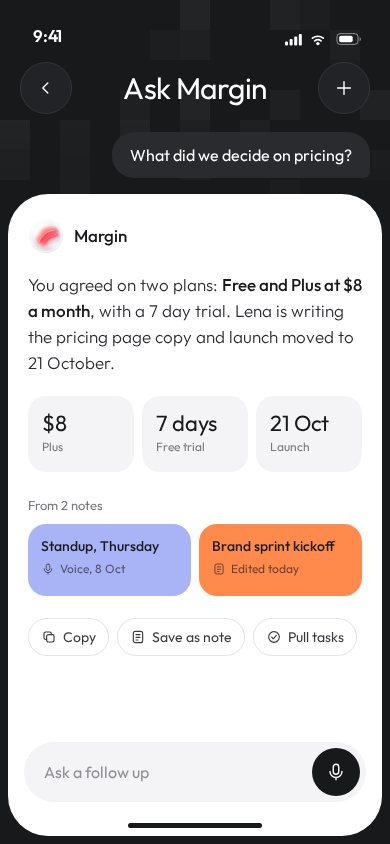
Margin is a complete AI note taking app: onboarding, sign in, a first-run setup, a home wall of colour note cards and photos, search, notebooks, a note with collaborators and a sketch, the note menu, editing, moving a note, voice recording with a transcript, AI summaries, asking your notes and reading the answer, tasks pulled from notes, insights, sharing, notifications, a paid plan, profile and settings. Charcoal dark with huge light headlines, pastel cards and a glossy coral orb for the assistant.
| Detail | Value |
|---|---|
| Screen type | Detail |
| App | Margin: AI note taking |
| Category | Productivity |
| Design language | Dark-first, dark |
| Type | Outfit |
| Colours | #18191b background, #222326 surface, #ffffff text, #9b9ca3 text-muted, #ff8a4c accent, #18191b accent-contrast, #a9b4f7 secondary, #34353a border, #f0625f danger |
What this screen says
- Ask Margin
- What did we decide on pricing?
- Margin
- You agreed on two plans: Free and Plus at $8 a month, with a 7 day trial. Lena is writing the pricing page copy and...
- $8Plus
- 7 daysFree trial
- 21 OctLaunch
- From 2 notes
- Standup, Thursday Voice, 8 Oct
- Brand sprint kickoff Edited today
- Copy Save as note Pull tasks
- Ask a follow up
Around it in Margin
More detail screens
- Frontdesk Ticket: Customer support inbox
- Campaign: Email marketing campaigns
- Outpost Previews: Schedule social posts
- Pageview Channel: Website analytics
- Polish Suggestion: Writing assistant and keyboard
- Tapline Link: Link-in-bio pages and analytics
- Quill Doc: Docs, wikis and databases in one workspace
- Tandem Channel: Team chat, channels and huddles
- Shipyard Issue: Issue tracking for product teams
- Canvas File: Design files and comments on mobile
- Merge Repository: Code, pull requests and reviews
- Query Answer: AI answers with sources
Every productivity app detail screen
What makes a good detail screen
- Lead with what identifies the item. A large image or title, the price or status, and the key facts at the top. People should know they are in the right place at a glance.
- Keep the main action visible. A sticky bottom button for Add to cart, Book or Play stays reachable while people scroll through details.
- Order information by importance. The facts that decide the choice come first; reviews, specifications and fine print further down.
- Use progressive disclosure. Long descriptions, specifications and policies can expand on tap rather than filling the screen.
The full detail screen guide and every example
Remix Margin free: describe your own app and it is drawn in this design. Or get its files from $10: Figma, React Native, SwiftUI, Flutter and HTML.