Templates · Form and input screens · Travel app · Manifest
Manifest Expenses screen
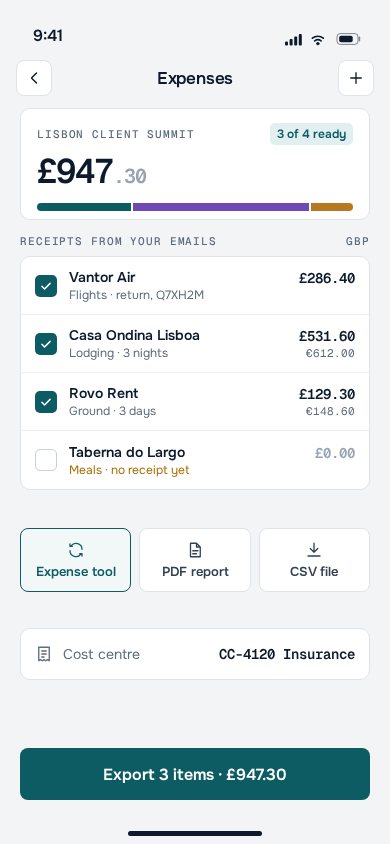
A form screen from Manifest, a travel app template in an Enterprise style. Screen 20 of 25.
Manifest is a complete trip organiser for people who travel for work: welcome, how forwarding works, sign in, a home with the next flight and live status, trips, a master itinerary timeline, flight details, the inbound aircraft on a live map, a gate change alert, alternate flights with a rebook and confirmation, a boarding pass, hotel and rental car details, a parsed email inbox, a manual plan form, documents, sharing with colleagues, an expense export, travel stats, alerts, a Pro plan, profile and settings. Cool grey and white with deep petrol and signal amber.
| Detail | Value |
|---|---|
| Screen type | Form |
| App | Manifest: Trip plans from your confirmation emails |
| Category | Travel |
| Design language | Enterprise, light |
| Type | Onest |
| Colours | #f3f4f6 background, #ffffff surface, #0c1a2b text, #5d6b7c text-muted, #0d5c63 accent, #ffffff accent-contrast, #f2a900 secondary, #dfe3e8 border, #c23a30 danger |
What this screen says
- Expenses
- Lisbon client summit 3 of 4 ready
- Receipts from your emails GBP
- Vantor Air
- Flights · return, Q7XH2M
- Casa Ondina Lisboa
- Lodging · 3 nights
- Rovo Rent
- Ground · 3 days
- Taberna do Largo
- Meals · no receipt yet
- Expense tool
- PDF report
- CSV file
- Cost centre CC-4120 Insurance
- Export 3 items · £947.30
Around it in Manifest
More form and input screens
- Roadster Charge schedule: Your electric car, from your phone
- Fairground Virtual queue: Theme park tickets, wait times and map
- Scoot Wallet: E-scooter and e-bike rental
- Nomad Turn on data: Travel eSIM data plans
- Tern Seats: Ferry and island hopping
- Berth Extras: Night trains and sleeper cabins
- Caravan Pickup: Campervan rental and road trips
- Layover Add flight: Airport guide, gates and lounges
- Permit Apply for e-visa: Visas and travel documents wallet
- Backroad Add stop: Road trip planner with stops
- Bunk Host a meetup: Hostels and backpacker meetups
- Piazza Rate walk: Self-guided city walking tours
What makes a good form screen
- Ask only what you need. Every field is a reason to stop. Remove optional fields or move them to later.
- Labels above fields. Visible labels stay readable while people type; placeholder-only labels disappear.
- Use the right keyboard and input. Number pads for amounts, email keyboards for email, pickers for dates and autofill for addresses and codes.
- Validate as people go. Show problems next to the field when people leave it, in words that say how to fix them.
The full form screen guide and every example
Remix Manifest free: describe your own app and it is drawn in this design. Or get its files from $10: Figma, React Native, SwiftUI, Flutter and HTML.