Templates · Player, camera and editor screens · Lifestyle app · Mane
Mane Try on screen
A media screen from Mane, an AI hairstyle try-on app template in a Glass style. Screen 10 of 25.
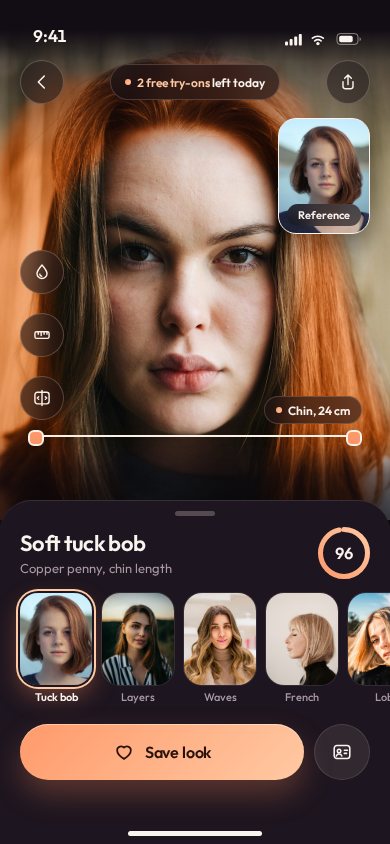
Mane is a complete AI hairstyle app: a selfie guide, camera and face scan, a face shape result with proportion bars, a hair profile, a home with today's top match, style pages with match, upkeep and length, try on, a split compare, a colour lab with glossy shade strands, length and fringe, beard, saved looks, a barber card with guard numbers, trends, collections, a care routine, a growth tracker, reminders, salons, a paywall and settings. Dark plum with warm glass, copper, peach and cream.
| Detail | Value |
|---|---|
| Screen type | Media |
| App | Mane: AI hairstyle try-on |
| Category | Lifestyle |
| Design language | Glass, dark |
| Type | Outfit |
| Colours | #120d14 background, #231a26 surface, #fbf3ee text, #ab9aa3 text-muted, #ff9a6b accent, #2a1208 accent-contrast, #ffc9a3 secondary, #3a2d3c border, #ff7a7a danger |
What this screen says
- Chin, 24 cm
- 2 free try-ons left today
- Reference
- Soft tuck bob
- Copper penny, chin length
- Tuck bob
- Layers
- Waves
- French
- Lob
- Save look
Around it in Mane
More player, camera and editor screens
- Admit Scanner: Events and tickets near you
- Natal Live reading: Birth charts and daily astrology
- Sillage Scan bottle: Fragrance wardrobe
- Inked Try on: Tattoo artists and bookings
- Scrapbook Editor: Digital scrapbook journal
- Rinse Scan label: Laundry pickup and delivery
- Sable Story: Fashion store
- Bazaar Photos: Local buy and sell
- Drape Add item: AI wardrobe and daily outfits
- Annex New project: AI interior redesign
- Kino Player: Film and series streaming
- Grain Camera: Camera and photo editor
Every lifestyle app media screen
What makes a good media player screen
- Content takes the space. Artwork, video or the camera view should fill most of the screen.
- Primary controls in the thumb zone. Play and pause, the shutter or the main tool, large and low on the screen.
- Show progress and position. A scrubber with elapsed and remaining time, or the step in a lesson.
- Hide secondary controls until needed. Lyrics, queue, filters and advanced tools can live behind a tap or a swipe.
The full media player screen guide and every example
Remix Mane free: describe your own app and it is drawn in this design. Or get its files from $10: Figma, React Native, SwiftUI, Flutter and HTML.