Templates · List and feed screens · Smart home app · Lobby
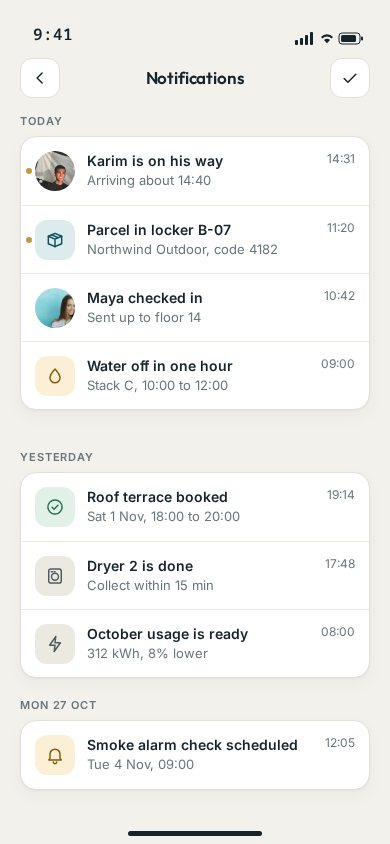
Lobby Notifications screen
A list screen from Lobby, an apartment building app template in an Enterprise style. Screen 22 of 25.
Lobby is a complete resident app for a 22 floor apartment building: welcome, sign in with a building invite, a home with your unit on a brass elevator dial, a phone door key, packages with locker codes, guest passes with a QR, amenity search, a rooftop booking with time slots and confirmation, maintenance requests with a live timeline, building notices, elevator and service status, laundry machines, a community board, utility usage, notifications, a concierge plan, profile and settings. Limestone and white with deep petrol teal and brass.
| Detail | Value |
|---|---|
| Screen type | List |
| App | Lobby: Apartment building app |
| Category | Smart home |
| Design language | Enterprise, light |
| Type | Outfit for headings, Inter for text |
| Colours | #f3f1ec background, #ffffff surface, #15232a text, #68767b text-muted, #0d4f5c accent, #ffffff accent-contrast, #c4983f secondary, #e3dfd5 border, #b8392f danger |
What this screen says
- Notifications
- Today
- Karim is on his way
- Arriving about 14:40
- Parcel in locker B-07
- Northwind Outdoor, code 4182
- Maya checked in
- Sent up to floor 14
- Water off in one hour
- Stack C, 10:00 to 12:00
- Yesterday
- Roof terrace booked
- Sat 1 Nov, 18:00 to 20:00
- Dryer 2 is done
- Collect within 15 min
- October usage is ready
- 312 kWh, 8% lower
- Mon 27 Oct
- Smoke alarm check scheduled
- Tue 4 Nov, 09:00
Around it in Lobby
More list and feed screens
- Mesh Devices: Home Wi-Fi network
- Decibel Queue: Multi-room speakers
- Nursery Lullabies: Baby monitor camera and sleep
- Porch Cameras: Home security cameras
- Sundial Roof: Solar panels and home battery
- Puddle Zones: Garden watering and sprinklers
- Upkeep Calendar: Home maintenance calendar
- Kelvin Rooms: Climate and thermostat
- Glow Rooms: Light scenes and colour
- Tagged Rooms: Home inventory for insurance
- Sweep Rooms: Robot vacuum and mop
- Dusk Notifications: Smart home scenarios
Every smart home app list screen
What makes a good list screen
- Show what people need to decide. Each row should carry just enough to choose: a title, one or two details and a status. Everything else belongs on the detail screen.
- Keep rows consistent. The same information in the same place on every row lets people scan down a column instead of reading each item.
- Group with headings. Dates, categories or status headings break long lists into chunks people can skip through.
- Make common actions quick. Swipe actions, a checkbox or a heart on the row save opening the item for small tasks.
The full list screen guide and every example
Remix Lobby free: describe your own app and it is drawn in this design. Or get its files from $10: Figma, React Native, SwiftUI, Flutter and HTML.