Templates · Onboarding screens · Finance app · Levy
Levy Setup screen
An onboarding screen from Levy, a taxes for freelancers app template in a Brutalist style. Screen 2 of 25.
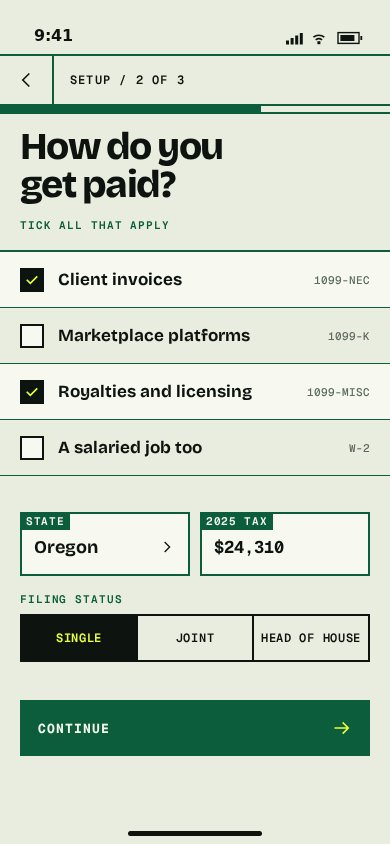
Levy is a complete tax app for freelancers: welcome, setup and sign in, a home with the next quarterly estimate and the tax vault that covers it, client income with an automatic 29% split, expenses with receipt scanning and a log form, live mileage tracking, search by Schedule C line, deductions, a full year estimate, the Q4 payment with review, a paid stamp, the vault, 1099 forms, deadlines, a return checklist, notifications, Levy Pro, profile and settings. Form paper, form green rules and a highlighter yellow.
| Detail | Value |
|---|---|
| Screen type | Onboarding |
| App | Levy: Taxes for freelancers |
| Category | Finance |
| Design language | Brutalist, light |
| Type | Bricolage Grotesque |
| Colours | #e9eddf background, #f7f9f0 surface, #0d130f text, #5c6a60 text-muted, #0b5d3b accent, #f4f7ec accent-contrast, #eaff3b secondary, #0b5d3b border, #c8371d danger |
What this screen says
- Setup / 2 of 3
- How do you
- get paid?
- Tick all that apply
- Client invoices 1099-NEC
- Marketplace platforms 1099-K
- Royalties and licensing 1099-MISC
- A salaried job too W-2
- STATE
- Oregon
- 2025 TAX
- Filing status
- Single
- Joint
- Head of house
- Continue
Around it in Levy
More onboarding screens
- Roundup Welcome: Invest your spare change
- Envelope Welcome: Give every dollar a job
- Recur Welcome: Track and cancel subscriptions
- Keel Welcome: Corporate cards and spend controls
- Giftly Welcome: Gift cards, sent and stored
- Zap Welcome: Pay friends with a note
- Billfold Welcome: Cards, passes and tickets wallet
- Payly Welcome: UPI payments, recharges and bills
- Crest Welcome: Credit card bills and rewards
- Storefront Welcome: Run your online store
- Bastion Welcome: Everyday banking from a big bank
- Later Welcome: Buy now, pay in four
Every finance app onboarding screen
What makes a good onboarding screen
- One idea per screen. Each screen should say one thing in a headline people can read in a second. If a screen needs a paragraph, it is doing too much.
- Personalise with a purpose. Ask a question only if the answer changes what people see next, like a goal, a level or an interest. Then show that the answer mattered.
- Explain permissions before asking. Show your own screen saying why you need notifications, location or the camera before the system prompt. People who understand the reason are more likely to allow it.
- Let people skip. A visible skip or "I'll do this later" respects returning users and the impatient. Make sure skipping still lands them somewhere useful.
The full onboarding screen guide and every example
Remix Levy free: describe your own app and it is drawn in this design. Or get its files from $10: Figma, React Native, SwiftUI, Flutter and HTML.