Templates · Form and input screens · Lifestyle app · Lendly
Lendly Lend an item screen
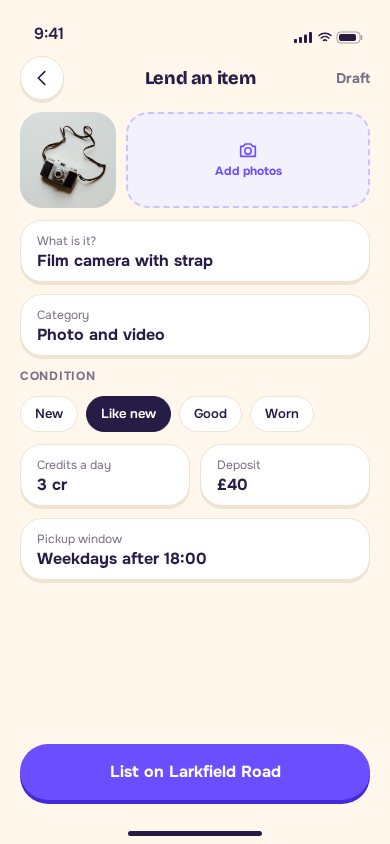
A form screen from Lendly, a borrow things from neighbours app template in a Playful style. Screen 17 of 25.
Lendly is a complete library of things for your street: welcome, sign in, address check, an explore home with categories and fresh listings, search, a map with credit pins, a party gear category, an item page with condition photos, deposit and owner, the owner's profile, a date picker, a request with deposit and damage cover, request sent, borrowing, a pickup screen with a handover code, a return checklist, ratings, listing your own item, approving requests, inbox and chat, community credits, Lendly Plus, notifications, profile and settings. Oat, grape and sunflower with mint and coral.
| Detail | Value |
|---|---|
| Screen type | Form |
| App | Lendly: Borrow things from neighbours |
| Category | Lifestyle |
| Design language | Playful, light |
| Type | Bricolage Grotesque for headings, Onest for text |
| Colours | #fff7ec background, #ffffff surface, #261c45 text, #7a6f86 text-muted, #6b4eff accent, #ffffff accent-contrast, #ffc83d secondary, #efe3d2 border, #d64545 danger |
What this screen says
- Lend an item
- Draft
- Add photos
- What is it? Film camera with strap
- Category Photo and video
- Condition
- New Like new Good Worn
- Credits a day 3 cr
- Deposit £40
- Pickup window Weekdays after 18:00
- List on Larkfield Road
Around it in Lendly
More form and input screens
- Posy Build a bouquet: Flower delivery and weekly stems
- Fern Log watering: Plant care
- Doorstep Filters: Homes for sale and rent
- Rewear Make an offer: Secondhand fashion marketplace
- Laced Release alert: Sneaker drops and raffles
- Gloss Write a review: Salon and spa booking
- Vow Add expense: Wedding planner
- Drizzle Edit widget: Weather with living skies
- Shelf Log progress: Reading tracker and book club
- Marquee Write a review: Cinema tickets and watchlist
- Handy Address: Home services
- Tasker Task details: Book and do local odd jobs
Every lifestyle app form screen
What makes a good form screen
- Ask only what you need. Every field is a reason to stop. Remove optional fields or move them to later.
- Labels above fields. Visible labels stay readable while people type; placeholder-only labels disappear.
- Use the right keyboard and input. Number pads for amounts, email keyboards for email, pickers for dates and autofill for addresses and codes.
- Validate as people go. Show problems next to the field when people leave it, in words that say how to fix them.
The full form screen guide and every example
Remix Lendly free: describe your own app and it is drawn in this design. Or get its files from $10: Figma, React Native, SwiftUI, Flutter and HTML.