Templates · Success and confirmation screens · Sports app · Lapse
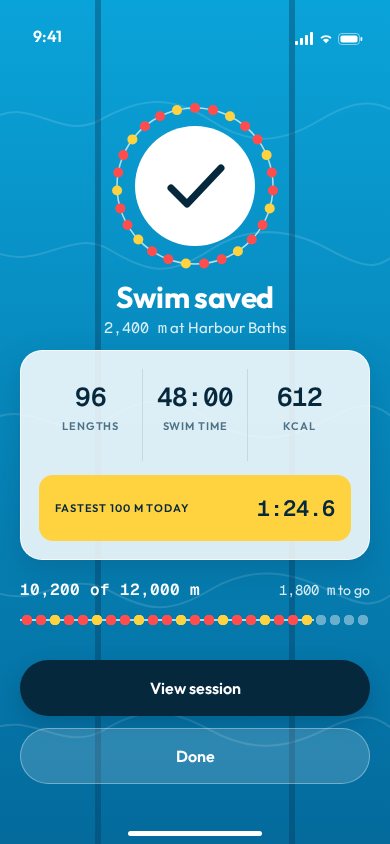
Lapse Swim saved screen
A success screen from Lapse, a swim training app template in a Glass style. Screen 9 of 25.
Lapse is a complete swim training app seen from above the water: welcome, sign in, setting up your pool, a home with this morning's swim and the week's distance, logging a set, a session with lap splits and stroke rate, a pace clock, a pool finder with lane availability, technique drills, training plans, a swim log, personal bests, a weekly goal, a Plus plan, notifications, profile and settings. Everything is drawn: lane lines, ropes, a pace clock dial and stroke pictograms.
| Detail | Value |
|---|---|
| Screen type | Success |
| App | Lapse: Swim training |
| Category | Sports |
| Design language | Glass, light |
| Type | Outfit |
| Colours | #0aa3d9 background, #ffffff surface, #06283d text, #4d7186 text-muted, #ff4d4d accent, #ffffff accent-contrast, #ffd23f secondary, #046a9c border, #ff4d4d danger |
What this screen says
- Swim saved
- 2,400 m at Harbour Baths
- 96Lengths
- 48:00Swim time
- 612Kcal
- Fastest 100 m today 1:24.6
- 10,200 of 12,000 m1,800 m to go
- View session
- Done
Around it in Lapse
More success and confirmation screens
- Frag Registered: Esports tournaments and teams
- Canter Booked: Riding stables and lessons
- Ollie Booked: Skate spots and clips
- Eddy Shuttle booked: River levels for paddlers
- Whistle Full time: Grassroots league manager for coaches
- Oche Leg won: Darts scorer and leagues
- Cairn Hike summary: Trails, contours and summits on one map sheet
- Angler Catch saved: A fishing log drawn on the depth chart
- Piste Pass ready: Ski resort companion
- Crag Sent: Climbing gym logbook
- Fairway Booked: Golf course guide and scorecard
- Matchday Transfers made: Football scores and fantasy
Every sports app success screen
What makes a good confirmation screen
- Confirm in the headline. "Payment sent", "Table booked for Friday at 8" or "Lesson complete" in plain words, with a clear success colour or icon.
- Repeat the key details. Amount, date, reference number or score, so people do not need to check elsewhere that the right thing happened.
- Say what happens next. When the order arrives, when the money lands, when the next lesson unlocks.
- Offer the next step. Track the order, add to calendar, share, or start the next lesson. One primary action and a way back home.
The full confirmation screen guide and every example
Remix Lapse free: describe your own app and it is drawn in this design. Or get its files from $10: Figma, React Native, SwiftUI, Flutter and HTML.