Templates · Detail screens · Fitness app · Labwork
Labwork Prep screen
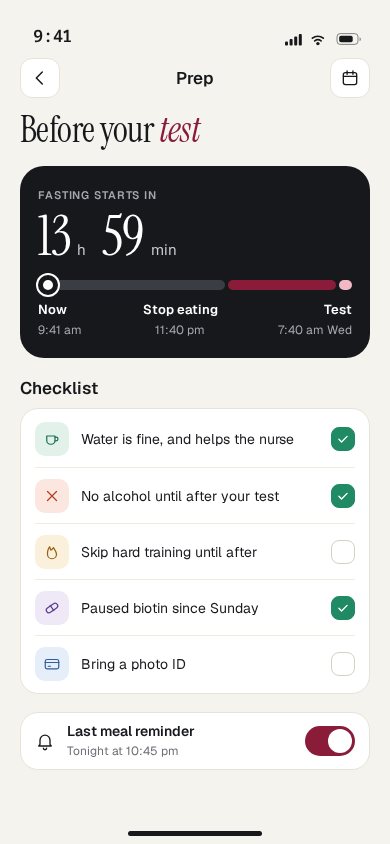
A detail screen from Labwork, a health and fitness app template in a Clinical style. Screen 12 of 25.
Labwork is a complete blood testing app for adults: welcome and health goals, sign in, a home with the next test and your latest score, a panel catalogue, a panel page, lab visit or home kit, a lab map, a time slot, checkout and a booking confirmed, fasting prep with a countdown, kit tracking, a finger prick guide, results, a full report, a biomarker against its reference range, trends over time, a doctor's note, a shareable PDF, retest plans, orders, notifications, profile and settings. Warm paper and white with deep garnet and a green, amber and coral range system.
| Detail | Value |
|---|---|
| Screen type | Detail |
| App | Labwork: Book blood tests and see results |
| Category | Health and fitness |
| Design language | Clinical, light |
| Type | Instrument Serif for headings, Geist for text |
| Colours | #f5f3ee background, #ffffff surface, #17181c text, #6d6f76 text-muted, #8a1c3a accent, #ffffff accent-contrast, #1f8a63 secondary, #e7e3da border, #e0553a danger |
What this screen says
- Prep
- Before your test
- Fasting starts in
- 13h 59min
- Now9:41 am Stop eating11:40 pm Test7:40 am Wed
- Checklist
- Water is fine, and helps the nurse
- No alcohol until after your test
- Skip hard training until after
- Paused biotin since Sunday
- Bring a photo ID
- Last meal reminderTonight at 10:45 pm
Around it in Labwork
More detail screens
- Unfold Class: Yoga and stretching
- Kilo Lift: Strength training log
- Cyra Day detail: Cycle tracker
- Harbor Entry: Therapy and mood
- Fasten Stages: Intermittent fasting
- Plate Food: Calorie and macro tracker
- Vita Test result: Personal health record
- Forge Workout: AI fitness and nutrition
- Lull Course: Sleep sounds and meditation
- Pace Workout: Fitness tracker
- Flexpass Studio: One membership, many studios
- Clinic Doctor: Find and book doctors
Every fitness app detail screen
What makes a good detail screen
- Lead with what identifies the item. A large image or title, the price or status, and the key facts at the top. People should know they are in the right place at a glance.
- Keep the main action visible. A sticky bottom button for Add to cart, Book or Play stays reachable while people scroll through details.
- Order information by importance. The facts that decide the choice come first; reviews, specifications and fine print further down.
- Use progressive disclosure. Long descriptions, specifications and policies can expand on tap rather than filling the screen.
The full detail screen guide and every example
Remix Labwork free: describe your own app and it is drawn in this design. Or get its files from $10: Figma, React Native, SwiftUI, Flutter and HTML.