Templates · Player, camera and editor screens · Social app · Kindly
Kindly Story screen
A media screen from Kindly, a volunteering near you app template in a Playful style. Screen 21 of 25.
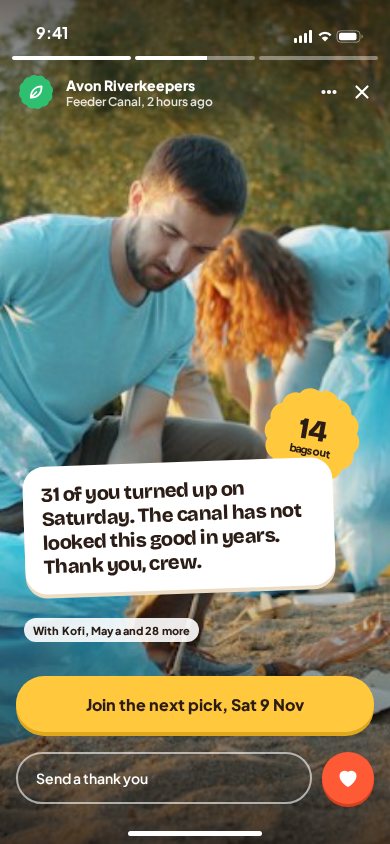
Kindly is a complete local volunteering app: welcome, picking causes, sign in, a home with your next shift ticket, explore with a list and a map of rosette pins, an opportunity, a charity page, picking a shift, confirming and a booked screen, your shifts, a day of check in with a route and a QR pass, a live shift timer, a thank you note, logging hours, an impact dashboard, rosette badges, teams, a team page, a charity story, notifications, Kindly Plus, profile and settings. Warm oat and white with tomato, sunflower and four more cause colours.
| Detail | Value |
|---|---|
| Screen type | Media |
| App | Kindly: Volunteering near you |
| Category | Social |
| Design language | Playful, light |
| Type | Bricolage Grotesque for headings, Plus Jakarta Sans for text |
| Colours | #fff6ea background, #ffffff surface, #2b1d16 text, #8a7a6c text-muted, #ff5a36 accent, #ffffff accent-contrast, #ffc83d secondary, #f1e3cf border, #e5484d danger |
What this screen says
- Avon RiverkeepersFeeder Canal, 2 hours ago
- 14bags out
- 31 of you turned up on Saturday. The canal has not looked this good in years. Thank you, crew.
- With Kofi, Maya and 28 more
- Join the next pick, Sat 9 Nov
- Send a thank you
Around it in Kindly
More player, camera and editor screens
- Natter Story: Minimal messenger
- Quorum Photo: Questions and expert answers
- Backer Video: Support creators with memberships
- Pledge Campaign video: Back creative projects
- Guild Voice room: Community servers with voice and text chat
- Parrot Shared media: Private messaging, groups and calls
- Carrier Photo: Cloud messaging with channels
- Vista Story: Photos, stories and reels
- Flick Camera: Short video feed
- Squawk Photo: Short posts and live conversation
- Agora Viewer: Communities, threads and votes
- Spark Video date: Swipe dating
What makes a good media player screen
- Content takes the space. Artwork, video or the camera view should fill most of the screen.
- Primary controls in the thumb zone. Play and pause, the shutter or the main tool, large and low on the screen.
- Show progress and position. A scrubber with elapsed and remaining time, or the step in a lesson.
- Hide secondary controls until needed. Lyrics, queue, filters and advanced tools can live behind a tap or a swipe.
The full media player screen guide and every example
Remix Kindly free: describe your own app and it is drawn in this design. Or get its files from $10: Figma, React Native, SwiftUI, Flutter and HTML.