Templates · Detail screens · Fitness app · Kilo
Kilo Session screen
A detail screen from Kilo, a strength training log app template in a Brutalist style. Screen 15 of 25.
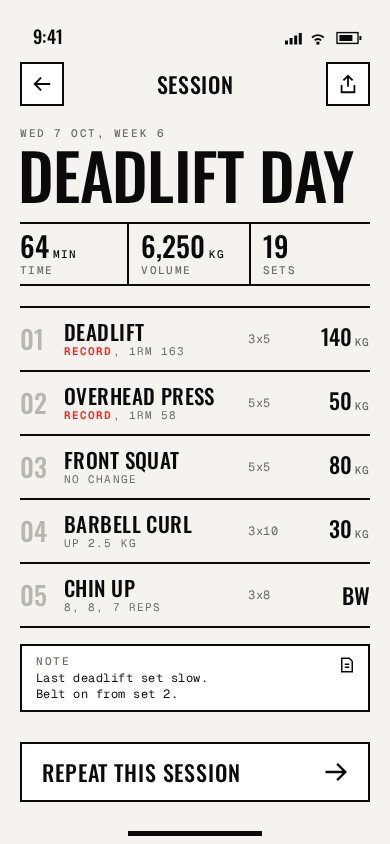
Kilo is a complete lifting log: welcome, sign in, a short setup, today's workout, a live session with a set table and a rest timer, a plate calculator that draws the loaded bar, an exercise library, lift history, a finished session and a new record. Around it sit history, records, programs, weekly volume and body stats, a weigh in, a Pro plan, notifications, profile and settings. Everything is kilograms, reps and big numbers.
| Detail | Value |
|---|---|
| Screen type | Detail |
| App | Kilo: Strength training log |
| Category | Health and fitness |
| Design language | Brutalist, light |
| Type | Oswald |
| Colours | #f4f3ef background, #ffffff surface, #0a0a0a text, #6e6c66 text-muted, #f0231b accent, #ffffff accent-contrast, #0a0a0a secondary, #0a0a0a border, #f0231b danger |
What this screen says
- Session
- Wed 7 Oct, week 6
- Deadlift day
- 64min
- Time
- 6,250kg
- Volume
- Sets
- DeadliftRecord, 1RM 163
- 3x5 140kg
- Overhead pressRecord, 1RM 58
- 5x5 50kg
- Front squatNo change
- 5x5 80kg
- Barbell curlUp 2.5 kg
- 3x10 30kg
- Chin up8, 8, 7 reps
- 3x8 BW
- Note
- Last deadlift set slow.
- Belt on from set 2.
- Repeat this session
Around it in Kilo
More detail screens
- Exhale Box breathing: Breathwork sessions
- Bump This week: Pregnancy week by week
- Locker Check in: Gym membership and class booking
- Morsel Result: AI calorie tracker
- Dew Concern: AI skin scan and routine
- Cradle Sleep: Baby tracker
- Medly Suggested care: Doctor on call
- Donor Centre: Blood donation, counted drop by drop
- Unfold Class: Yoga and stretching
- Cyra Day detail: Cycle tracker
- Harbor Entry: Therapy and mood
- Fasten Stages: Intermittent fasting
Every fitness app detail screen
What makes a good detail screen
- Lead with what identifies the item. A large image or title, the price or status, and the key facts at the top. People should know they are in the right place at a glance.
- Keep the main action visible. A sticky bottom button for Add to cart, Book or Play stays reachable while people scroll through details.
- Order information by importance. The facts that decide the choice come first; reviews, specifications and fine print further down.
- Use progressive disclosure. Long descriptions, specifications and policies can expand on tap rather than filling the screen.
The full detail screen guide and every example
Remix Kilo free: describe your own app and it is drawn in this design. Or get its files from $10: Figma, React Native, SwiftUI, Flutter and HTML.