Templates · Search and explore screens · Fitness app · Jab
Jab Workouts screen
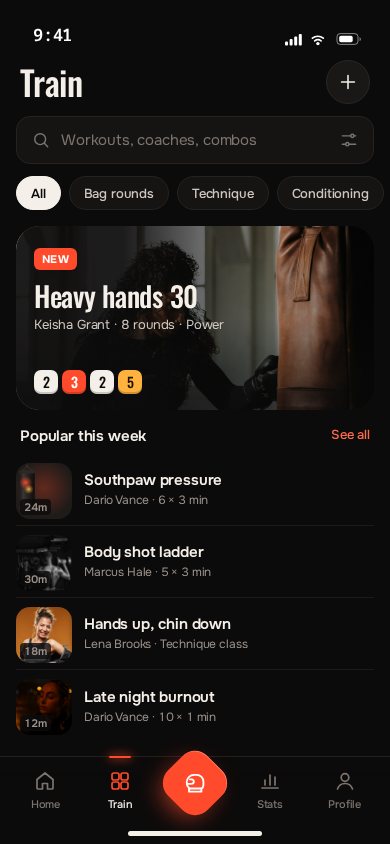
A search screen from Jab, a health and fitness app template in a Dark-first style. Screen 5 of 25.
Jab is a complete smart bag boxing app: welcome, pairing the bag sensor, sign in, a home with today's workout and the week's output, workouts and a workout page with its combos, a coach, a live round with a round timer and a glowing bag, the rest between rounds, a class video, a finished workout, a round by round session, stats, a punch map, history, a combo builder, challenges and a leaderboard, booking a 1:1 with a coach and its confirmation, the smart bag, a Pro plan, notifications, profile and settings. Warm black with glove red, amber and ice blue.
| Detail | Value |
|---|---|
| Screen type | Search |
| App | Jab: Boxing workouts with a smart bag |
| Category | Health and fitness |
| Design language | Dark-first, dark |
| Type | Oswald for headings, Onest for text |
| Colours | #0c0b0b background, #161413 surface, #f4efe8 text, #9a918a text-muted, #ff4a2b accent, #ffffff accent-contrast, #ffb23e secondary, #262220 border, #8fd8ff success |
What this screen says
- Train
- Workouts, coaches, combos
- All Bag rounds Technique Conditioning
- New
- Heavy hands 30
- Keisha Grant · 8 rounds · Power 2 3 2 5
- Popular this week
- See all
- 24m
- Southpaw pressure
- Dario Vance · 6 × 3 min
- 30m
- Body shot ladder
- Marcus Hale · 5 × 3 min
- 18m
- Hands up, chin down
- Lena Brooks · Technique class
- 12m
- Late night burnout
- Dario Vance · 10 × 1 min
- Home
- Stats
- Profile
Around it in Jab
More search and explore screens
- Cradle Search: Baby tracker
- Medly Find a doctor: Doctor on call
- Donor Centres: Blood donation, counted drop by drop
- Unfold Search: Yoga and stretching
- Kilo Exercises: Strength training log
- Harbor Therapist match: Therapy and mood
- Plate Add food: Calorie and macro tracker
- Vita Doctors: Personal health record
- Forge Log meal: AI fitness and nutrition
- Lull Search: Sleep sounds and meditation
- Pace Explore: Fitness tracker
- Flexpass Search: One membership, many studios
Every fitness app search screen
What makes a good search screen
- Show something before people type. Recent searches, popular items or categories make the empty search screen useful and save typing.
- Suggest as people type. Autocomplete with matching items, not only matching words, lets people jump straight to a result.
- Make filters visible and reversible. Show active filters as chips that can be removed in one tap, and the number of results as filters change.
- Forgive typos. Close matches and "Did you mean" stop a spelling mistake from ending in an empty screen.
The full search screen guide and every example
Remix Jab free: describe your own app and it is drawn in this design. Or get its files from $10: Figma, React Native, SwiftUI, Flutter and HTML.