Templates · Form and input screens · Lifestyle app · Kibble
Kibble Add pet screen
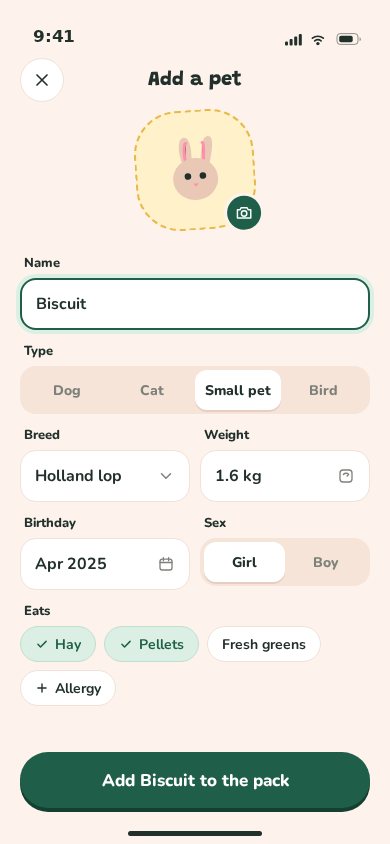
A form screen from Kibble, a pet supplies and autoship app template in a Playful style. Screen 17 of 25.
Kibble is a complete pet supplies app: welcome and pet setup, sign in, a home that knows when the food runs out, shop by pet, search with filters, a product page with sizes and autoship savings, reviews, cart, checkout and confirmation, live delivery tracking, orders, autoship schedules and edits, pet profiles with weight and diet, a pharmacy with refill requests, a vet chat, a spend dashboard, a membership plan, notifications, account and settings. Blush cream and white with deep pine green, bubblegum pink and butter yellow.
| Detail | Value |
|---|---|
| Screen type | Form |
| App | Kibble: Pet supplies and autoship |
| Category | Lifestyle |
| Design language | Playful, light |
| Type | Grandstander for headings, Nunito for text |
| Colours | #fdf2ec background, #ffffff surface, #22302b text, #7d817a text-muted, #1f5f4a primary, #143f31 primary-ledge, #ff8fab accent, #e8557e accent-strong, #ffd166 highlight, #dcefe4 mint-tint, #ffe0e6 pink-tint, #fff1c9 butter-tint, #dfeefa sky-tint, #f1e1d8 border |
What this screen says
- Add a pet
- Name
- Biscuit
- Type
- Dog Cat Small pet Bird
- Breed
- Holland lop
- Weight
- 1.6 kg
- Birthday
- Apr 2025
- Sex
- Girl Boy
- Eats
- Hay Pellets Fresh greens Allergy
- Add Biscuit to the pack
Around it in Kibble
More form and input screens
- Dorm Filters: Find student housing
- Hem Alteration: Tailoring and alterations, collected
- Lendly Return: Borrow things from neighbours
- Stub Transfer: Fan to fan ticket resale
- Trove Save: Visual ideas and boards
- Vidi Details: Video platform for creators
- Roll New album: Photo library and backups
- Splice Speed: Video editor for short clips
- Blush Filters: Beauty and makeup shopping
- Flatpack Assembly: Furniture store with room previews
- Column Compose: Newsletters and independent writers
- Fetch Add pet: Dog walkers and pet sitters
Every lifestyle app form screen
What makes a good form screen
- Ask only what you need. Every field is a reason to stop. Remove optional fields or move them to later.
- Labels above fields. Visible labels stay readable while people type; placeholder-only labels disappear.
- Use the right keyboard and input. Number pads for amounts, email keyboards for email, pickers for dates and autofill for addresses and codes.
- Validate as people go. Show problems next to the field when people leave it, in words that say how to fix them.
The full form screen guide and every example
Remix Kibble free: describe your own app and it is drawn in this design. Or get its files from $10: Figma, React Native, SwiftUI, Flutter and HTML.