Templates · Booking and checkout screens · Finance app · Envelope
Envelope Reconcile screen
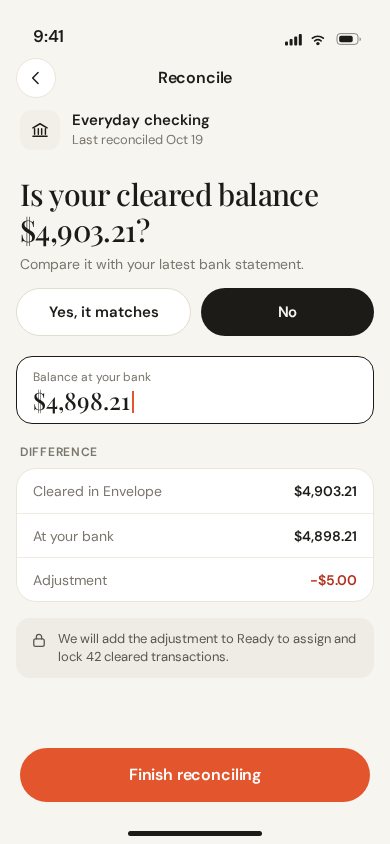
A checkout screen from Envelope, a finance app template in a Minimal style. Screen 15 of 25.
Envelope is a complete zero based budgeting app: welcome and category setup, sign in, a monthly budget with money ready to assign and category groups, a category with assigned, activity and available, assigning on a keypad, moving money to cover overspending, targets and quick assign, accounts and an account register, a transaction, adding and splitting transactions, reconciling with a confirmation, spending, net worth and age of money reports, search, scheduled transactions, notifications, a membership plan, profile and settings. Warm paper and ink with one vermilion accent.
| Detail | Value |
|---|---|
| Screen type | Checkout |
| App | Envelope: Give every dollar a job |
| Category | Finance |
| Design language | Minimal, light |
| Type | Playfair Display for headings, DM Sans for text |
| Colours | #f7f5f0 background, #ffffff surface, #1c1b18 text, #7a766d text-muted, #e2552d accent, #ffffff accent-contrast, #1c1b18 secondary, #ebe6dc border, #c8392b danger |
What this screen says
- Reconcile
- Everyday checkingLast reconciled Oct 19
- Is your cleared balance $4,903.21?
- Compare it with your latest bank statement.
- Yes, it matches
- No
- Balance at your bank
- Difference
- Cleared in Envelope $4,903.21
- At your bank $4,898.21
- Adjustment -$5.00
- We will add the adjustment to Ready to assign and lock 42 cleared transactions.
- Finish reconciling
Around it in Envelope
More booking and checkout screens
- Halden Review transfer: Premium neobank
- Billable Start timer: Time tracking and invoices, kept like a ledger
- Lease Pay rent: Your tenancy, drawn to plan
- Claim Review and submit: Expenses, filed like a till receipt
- Divvy Review payment: Split bills with friends
- Ticker Review order: Stock investing
- Burrow Take money out: Shared savings pots
- Remit Delivery method: International money transfer
- Settle Review: Bill payments and banking
- Fathom Review order: Crypto wallet
- Marigold Review: Mobile banking
- Zentra Deposit: Crypto trading
Every finance app checkout screen
What makes a good checkout screen
- Show the total early and honestly. Taxes, delivery and service fees should appear before the last step. A higher total on the final screen feels like a trick.
- Offer wallet payments. Apple Pay and Google Pay skip card typing entirely. Show them first when they are available.
- Ask for the minimum. Only the fields needed to deliver or book. Save details for next time.
- Let people review before paying. A clear summary of items, dates, address and price, with each part editable without starting over.
The full checkout screen guide and every example
Remix Envelope free: describe your own app and it is drawn in this design. Or get its files from $10: Figma, React Native, SwiftUI, Flutter and HTML.