Templates · Detail screens · Productivity app · Keyring
Keyring Secure note screen
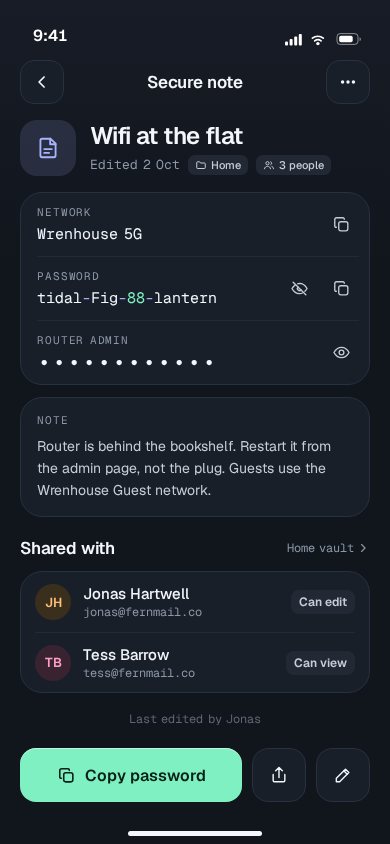
A detail screen from Keyring, a password manager app template in a Dark-first style. Screen 15 of 25.
Keyring is a complete password manager: welcome, sign in, a master password with a strength meter, a recovery kit, passcode unlock, the vault home, search, every login, a login with its one-time code and history, new items, a password generator, cards, secure notes, a security score with weak, reused and breached passwords, a breach alert, autofill setup, shared vaults and sharing an item, alerts, a Plus plan, profile and settings. Mint means safe, apricot means weak and coral means breached.
| Detail | Value |
|---|---|
| Screen type | Detail |
| App | Keyring: Password manager |
| Category | Productivity |
| Design language | Dark-first, dark |
| Type | Geist |
| Colours | #11151c background, #191f29 surface, #f3f6fa text, #8c97a8 text-muted, #7ef0c1 accent, #0a1f18 accent-contrast, #a7b4ff secondary, #283140 border, #ff7d7d danger |
What this screen says
- Secure note
- Wifi at the flat
- Edited 2 Oct Home 3 people
- Network
- Wrenhouse 5G
- Password
- tidal-Fig-88-lantern
- Router admin
- ••••••••••••
- Note
- Router is behind the bookshelf. Restart it from the admin page, not the plug. Guests use the Wrenhouse Guest network.
- Shared with
- Home vault
- JH
- Jonas Hartwell
- jonas@fernmail.co
- Can edit
- TB
- Tess Barrow
- tess@fernmail.co
- Can view
- Last edited by Jonas
- Copy password
Around it in Keyring
More detail screens
- Postbox Thread: Email for busy teams
- Daybook Event: Calendar and planner
- Scanly Document: Document scanner
- Rota Shift detail: Shift scheduling for hourly teams
- Inkwell Entry: Daily journal
- Shortlist Job: Job search and application tracker
- Parley Chat: Team messenger
- Docket Task: Task and sprint planner
- Kanso Project: Tasks, calendar and chat
- Margin Notebook: AI note taking
- Aide Meeting brief: Executive AI assistant
- Juno Chat: AI chat assistant
Every productivity app detail screen
What makes a good detail screen
- Lead with what identifies the item. A large image or title, the price or status, and the key facts at the top. People should know they are in the right place at a glance.
- Keep the main action visible. A sticky bottom button for Add to cart, Book or Play stays reachable while people scroll through details.
- Order information by importance. The facts that decide the choice come first; reviews, specifications and fine print further down.
- Use progressive disclosure. Long descriptions, specifications and policies can expand on tap rather than filling the screen.
The full detail screen guide and every example
Remix Keyring free: describe your own app and it is drawn in this design. Or get its files from $10: Figma, React Native, SwiftUI, Flutter and HTML.