Templates · Booking and checkout screens · Travel app · Keycard
Keycard Review booking screen
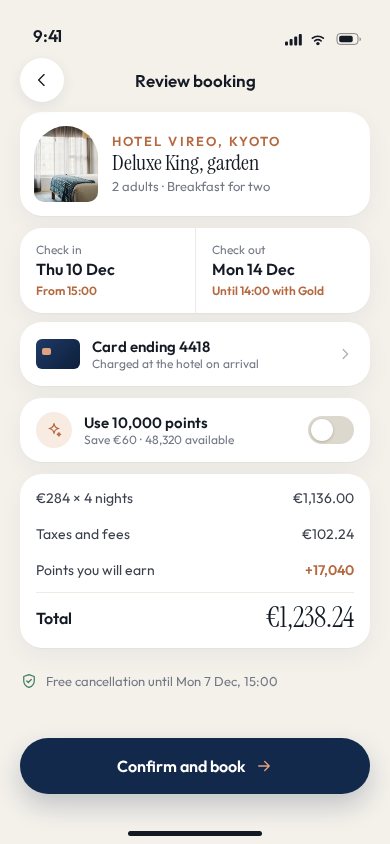
A checkout screen from Keycard, a travel app template in a Luxury style. Screen 8 of 25.
Keycard is a complete hotel stay app: welcome, sign in, a home built around the stay you are in, search, results, a hotel page, room rates, booking review and confirmation, your stays, a stay with its details, mobile check in, a digital room key, in room dining with a dish, an order and live order status, a chat with the front desk, housekeeping requests, the bill, rewards with elite status, a paid Reserve membership, notifications, profile and settings. Linen and white with harbour navy and burnished copper.
| Detail | Value |
|---|---|
| Screen type | Checkout |
| App | Keycard: Hotel stays, digital key and room service |
| Category | Travel |
| Design language | Luxury, light |
| Type | Instrument Serif for headings, Outfit for text |
| Colours | #f4f1eb background, #ffffff surface, #141a24 text, #737785 text-muted, #b5683f accent, #ffffff accent-contrast, #13294b secondary, #e5e0d6 border, #c0432f danger |
What this screen says
- Review booking
- Hotel Vireo, Kyoto
- Deluxe King, garden
- 2 adults · Breakfast for two
- Check in Thu 10 DecFrom 15:00
- Check out Mon 14 DecUntil 14:00 with Gold
- Card ending 4418Charged at the hotel on arrival
- Use 10,000 pointsSave €60 · 48,320 available
- €284 × 4 nights €1,136.00
- Taxes and fees €102.24
- Points you will earn +17,040
- Total €1,238.24
- Free cancellation until Mon 7 Dec, 15:00
- Confirm and book
Around it in Keycard
More booking and checkout screens
- Caravan Dates: Campervan rental and road trips
- Layover Book lounge: Airport guide, gates and lounges
- Permit Review and pay: Visas and travel documents wallet
- Backroad Book stay: Road trip planner with stops
- Bunk Checkout: Hostels and backpacker meetups
- Piazza Get tour: Self-guided city walking tours
- Fjord Book excursion: Cruise companion on board
- Kerb Duration: Parking that reads like a road sign
- Linea Buy a ticket: City transit
- Hollow Dates: Cabin and boutique stays
- Aloft Choose seat: Flight tracker
- Pitch Dates: Campsite booking and trip kit
Every travel app checkout screen
What makes a good checkout screen
- Show the total early and honestly. Taxes, delivery and service fees should appear before the last step. A higher total on the final screen feels like a trick.
- Offer wallet payments. Apple Pay and Google Pay skip card typing entirely. Show them first when they are available.
- Ask for the minimum. Only the fields needed to deliver or book. Save details for next time.
- Let people review before paying. A clear summary of items, dates, address and price, with each part editable without starting over.
The full checkout screen guide and every example
Remix Keycard free: describe your own app and it is drawn in this design. Or get its files from $10: Figma, React Native, SwiftUI, Flutter and HTML.