Templates · Success and confirmation screens · Smart home app · Kelvin
Kelvin Service booked screen
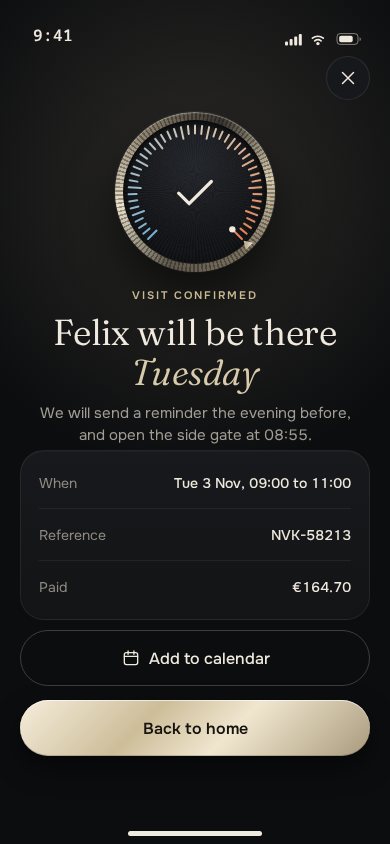
A success screen from Kelvin, a climate and thermostat app template in a Luxury style. Screen 21 of 25.
Kelvin is a complete luxury climate app: welcome, pairing a dial, sign in, a home with the living room dial, rooms, a room control with heat, cool and auto, the wine cellar, scenes, a weekday schedule and period editor, the forecast plan, live arrival preheating, away mode, air quality, history, energy, devices, the heat pump, a service booking with confirmation, alerts, a Reserve membership, profile and settings. Obsidian and ivory with champagne metal and a glacier to ember temperature scale.
| Detail | Value |
|---|---|
| Screen type | Success |
| App | Kelvin: Climate and thermostat |
| Category | Smart home |
| Design language | Luxury, dark |
| Type | Fraunces for headings, Onest for text |
| Colours | #0c0d0f background, #16181b surface, #efe9de text, #8f8b83 text-muted, #d8cbab accent, #17140f accent-contrast, #f0895a secondary, #26282c border, #e5675c danger |
What this screen says
- Visit confirmed
- Felix will be there Tuesday
- We will send a reminder the evening before, and open the side gate at 08:55.
- When Tue 3 Nov, 09:00 to 11:00
- Reference NVK-58213
- Paid €164.70
- Add to calendar
- Back to home
Around it in Kelvin
More success and confirmation screens
- Meter Reading sent: Your energy supplier account
- Couch Rented: TV remote, casting and watchlist
- Chime Routine saved: Voice assistant and smart speaker
- Latch Key sent: Smart locks and guest access
- Mesh Node added: Home Wi-Fi network
- Decibel Tuning done: Multi-room speakers
- Nursery Invite sent: Baby monitor camera and sleep
- Porch Plan active: Home security cameras
- Sundial Booked: Solar panels and home battery
- Puddle All watered: Garden watering and sprinklers
- Upkeep Logged: Home maintenance calendar
- Glow Scene saved: Light scenes and colour
Every smart home app success screen
What makes a good confirmation screen
- Confirm in the headline. "Payment sent", "Table booked for Friday at 8" or "Lesson complete" in plain words, with a clear success colour or icon.
- Repeat the key details. Amount, date, reference number or score, so people do not need to check elsewhere that the right thing happened.
- Say what happens next. When the order arrives, when the money lands, when the next lesson unlocks.
- Offer the next step. Track the order, add to calendar, share, or start the next lesson. One primary action and a way back home.
The full confirmation screen guide and every example
Remix Kelvin free: describe your own app and it is drawn in this design. Or get its files from $10: Figma, React Native, SwiftUI, Flutter and HTML.