Templates · List and feed screens · Productivity app · Juno
Juno Prompts screen
A list screen from Juno, an AI chat assistant app template in a Playful style. Screen 16 of 25.
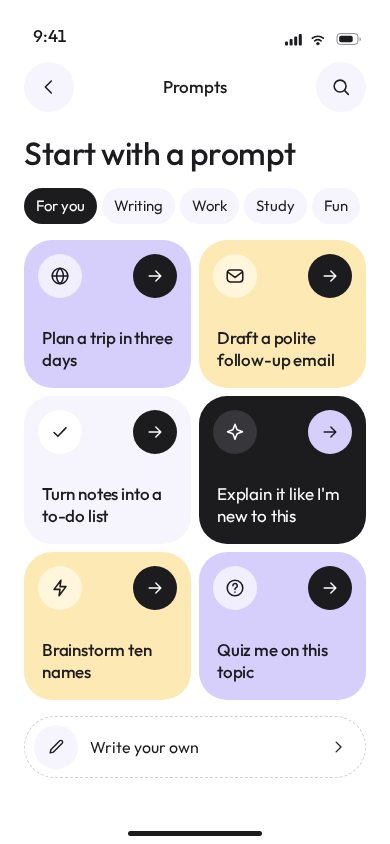
Juno is a complete AI assistant app: onboarding, sign in, a home of big pastel action cards, chat with charts in the answers, voice mode, search by image, image creation, a model picker, history, search, a saved library, a prompt gallery, custom assistants, plans with checkout, usage, profile and settings. Soft lavender and butter yellow on white with black pills and a ribbon of curved text.
| Detail | Value |
|---|---|
| Screen type | List |
| App | Juno: AI chat assistant |
| Category | Productivity |
| Design language | Playful, light |
| Type | Outfit |
| Colours | #ffffff background, #f6f5fd surface, #1c1c1f text, #8e8d99 text-muted, #d6cffb accent, #1c1c1f accent-contrast, #fde9b4 secondary, #ecebf5 border, #f26a6a danger |
What this screen says
- Prompts
- Start with a prompt
- For you Writing Work Study Fun
- Plan a trip in three days
- Draft a polite follow-up email
- Turn notes into a to-do list
- Explain it like I'm new to this
- Brainstorm ten names
- Quiz me on this topic
- Write your own
Around it in Juno
More list and feed screens
- Margin Notebooks: AI note taking
- Aide Notifications: Executive AI assistant
- Opal Projects: Studio dashboard
- Jot Folders: Quick notes and checklists
- Chrono Alarms: World clock, timers and stopwatch
- Frontdesk Views: Customer support inbox
- Campaigns: Email marketing campaigns
- Outpost Calendar: Schedule social posts
- Pageview Reports: Website analytics
- Polish Documents: Writing assistant and keyboard
- Tapline Links: Link-in-bio pages and analytics
- Quill Pages: Docs, wikis and databases in one workspace
Every productivity app list screen
What makes a good list screen
- Show what people need to decide. Each row should carry just enough to choose: a title, one or two details and a status. Everything else belongs on the detail screen.
- Keep rows consistent. The same information in the same place on every row lets people scan down a column instead of reading each item.
- Group with headings. Dates, categories or status headings break long lists into chunks people can skip through.
- Make common actions quick. Swipe actions, a checkbox or a heart on the row save opening the item for small tasks.
The full list screen guide and every example
Remix Juno free: describe your own app and it is drawn in this design. Or get its files from $10: Figma, React Native, SwiftUI, Flutter and HTML.