Templates · Onboarding screens · Social app · Huddle
Huddle Pick interests screen
An onboarding screen from Huddle, an interest groups and meetups app template in a Dark-first style. Screen 2 of 25.
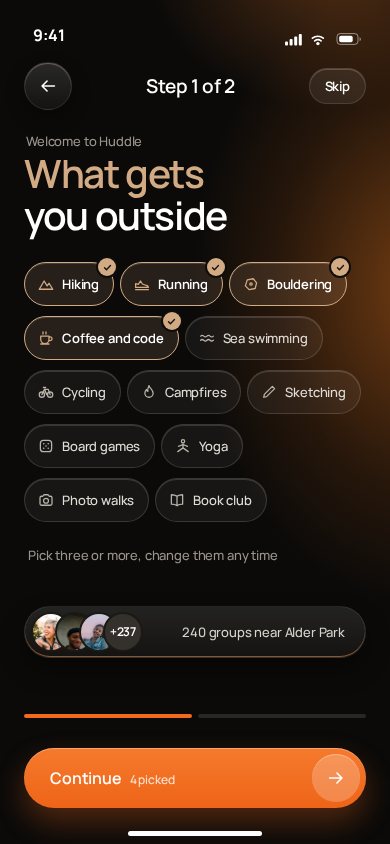
Huddle is a complete app for interest groups that meet up: welcome, picking interests, sign in, a home with your groups and a featured photo card, explore, group pages and members, group chat with voice notes and shared photos, video hangouts, events with RSVPs and a live meeting point, activity stats, notifications, a plus plan, profile and settings. Black with a warm amber glow, tan and white type and one orange.
| Detail | Value |
|---|---|
| Screen type | Onboarding |
| App | Huddle: Interest groups and meetups |
| Category | Social |
| Design language | Dark-first, dark |
| Type | Manrope |
| Colours | #0b0a09 background, #1b1a18 surface, #ffffff text, #9c958c text-muted, #f26a1e accent, #ffffff accent-contrast, #d2ab85 secondary, #2e2b27 border, #ff5a4d danger |
What this screen says
- Step 1 of 2
- Skip
- Welcome to Huddle
- What getsyou outside
- Hiking
- Running
- Bouldering
- Coffee and code
- Sea swimming
- Cycling
- Campfires
- Sketching
- Board games
- Yoga
- Photo walks
- Book club
- Pick three or more, change them any time
- 240 groups near Alder Park
- Continue4 picked
Around it in Huddle
More onboarding screens
- Squawk Welcome: Short posts and live conversation
- Agora Welcome: Communities, threads and votes
- Spark Welcome: Swipe dating
- Candid Welcome: One real photo a day
- Blink Welcome: Camera chat and stories
- Cipher Welcome: Encrypted private messenger
- Commons Welcome: Friends, groups and events
- Tether Welcome: Family location and safety
- Facet Welcome: Video calls with family and friends
- Stoop Welcome: Neighbourhood noticeboard
- Aura Welcome: Moods with close friends
- Kindly Welcome: Volunteering near you
Every social app onboarding screen
What makes a good onboarding screen
- One idea per screen. Each screen should say one thing in a headline people can read in a second. If a screen needs a paragraph, it is doing too much.
- Personalise with a purpose. Ask a question only if the answer changes what people see next, like a goal, a level or an interest. Then show that the answer mattered.
- Explain permissions before asking. Show your own screen saying why you need notifications, location or the camera before the system prompt. People who understand the reason are more likely to allow it.
- Let people skip. A visible skip or "I'll do this later" respects returning users and the impatient. Make sure skipping still lands them somewhere useful.
The full onboarding screen guide and every example
Remix Huddle free: describe your own app and it is drawn in this design. Or get its files from $10: Figma, React Native, SwiftUI, Flutter and HTML.