Templates · List and feed screens · Travel app · Atlas
Atlas Reviews screen
A list screen from Atlas, a maps and navigation app template in a Minimal style. Screen 8 of 25.
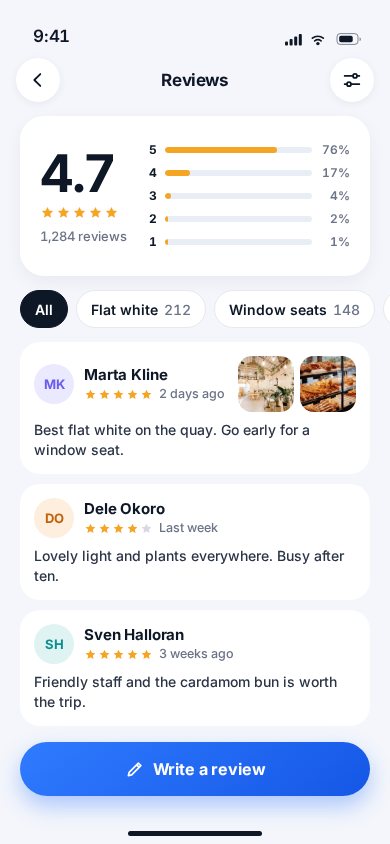
Atlas is a complete maps and navigation app for an invented city: onboarding, location access, a full screen map with search and category chips, results, place pages with photos and reviews, directions by car, transit, bike and foot, turn by turn navigation with lane guidance, transit steps and live departures, saved lists, recents, offline areas, live location sharing, reports, profile and settings. A warm drawn map under white sheets, with one vivid blue and a deep green turn banner.
| Detail | Value |
|---|---|
| Screen type | List |
| App | Atlas: Maps and navigation |
| Category | Travel |
| Design language | Minimal, light |
| Type | Inter |
| Colours | #f4f6fb background, #ffffff surface, #0e1726 text, #6b7486 text-muted, #1f6bff accent, #ffffff accent-contrast, #0c5a43 secondary, #e6e9f0 border, #e5484d danger |
What this screen says
- Reviews
- 1,284 reviews
- All
- Flat white 212
- Window seats 148
- Quiet mornings 96
- MK
- Marta Kline
- 2 days ago
- Best flat white on the quay. Go early for a window seat.
- DO
- Dele Okoro
- Last week
- Lovely light and plants everywhere. Busy after ten.
- SH
- Sven Halloran
- 3 weeks ago
- Friendly staff and the cardamom bun is worth the trip.
- Write a review
Around it in Atlas
More list and feed screens
- Staya Reviews: Homes and stays from local hosts
- Lodge Reviews: Hotels, deals and reservations
- Fare Results: Flight search and price alerts
- Rove Reviews: Reviews and things to do
- Ignition Results: Car rental from local hosts
- Contrail Flights: Airline booking, check-in and boarding
- Keycard Results: Hotel stays, digital key and room service
- Detour Gas prices: Community driving navigation
- Convoy My rides: Carpooling between cities
- Manifest Trips: Trip plans from your confirmation emails
- Roadster Trips: Your electric car, from your phone
- Fairground Wait times: Theme park tickets, wait times and map
What makes a good list screen
- Show what people need to decide. Each row should carry just enough to choose: a title, one or two details and a status. Everything else belongs on the detail screen.
- Keep rows consistent. The same information in the same place on every row lets people scan down a column instead of reading each item.
- Group with headings. Dates, categories or status headings break long lists into chunks people can skip through.
- Make common actions quick. Swipe actions, a checkbox or a heart on the row save opening the item for small tasks.
The full list screen guide and every example
Remix Atlas free: describe your own app and it is drawn in this design. Or get its files from $10: Figma, React Native, SwiftUI, Flutter and HTML.