Templates · Sign in and sign up screens · Lifestyle app · Grain
Grain Sign in screen
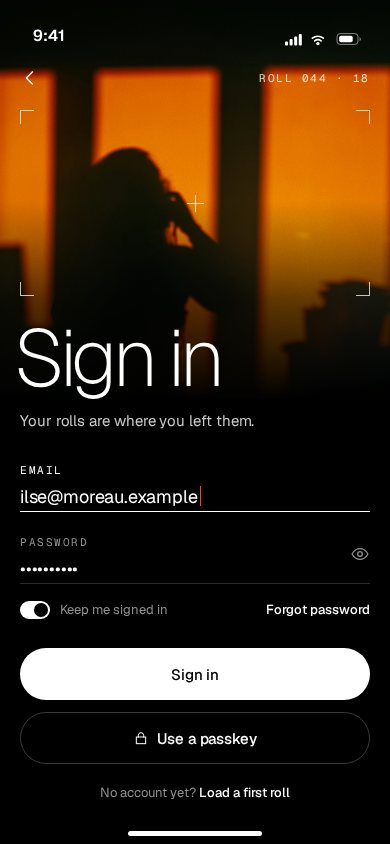
A sign in screen from Grain, a camera and photo editor app template in a Dark-first style. Screen 2 of 25.
Grain is a complete camera and photo editor: welcome and sign in, a library kept as rolls and contact sheets, albums, a manual camera with level, peaking and an exposure dial, a photo viewer with EXIF, histogram and a drawn map, editing for light, colour, curves, crop and masks, a browser of six invented film stocks with their characteristic curves, compare, versions, export and a success screen, a community feed with photographer profiles and search, a year of shooting stats, a Pro plan, notifications, profile and settings.
| Detail | Value |
|---|---|
| Screen type | Sign in |
| App | Grain: Camera and photo editor |
| Category | Lifestyle |
| Design language | Dark-first, dark |
| Type | Geist |
| Colours | #000000 background, #161616 surface, #ffffff text, #8f8f8f text-muted, #ffffff accent, #000000 accent-contrast, #5c5c5c secondary, #262626 border, #ff3b30 danger |
What this screen says
- Roll 044 · 18
- Sign in
- Your rolls are where you left them.
- Email ilse@moreau.example
- Password ••••••••••
- Keep me signed in Forgot password
- Use a passkey
- No account yet? Load a first roll
Around it in Grain
More sign in and sign up screens
- Stub Sign in: Fan to fan ticket resale
- Trove Sign in: Visual ideas and boards
- Vidi Sign in: Video platform for creators
- Roll Sign in: Photo library and backups
- Splice Sign in: Video editor for short clips
- Blush Sign in: Beauty and makeup shopping
- Flatpack Sign in: Furniture store with room previews
- Column Sign in: Newsletters and independent writers
- Fetch Sign in: Dog walkers and pet sitters
- Forecourt Sign in: Buy and sell used cars
- Tower Sign in: Mobile plan, data and bills
- Haul Sign up: Bargain fashion and finds
Every lifestyle app sign in screen
What makes a good login screen
- Offer the fastest option first. Sign in with Apple, Google or a passkey takes one tap. If you support them, put them above the email form. Apple asks apps that use a third-party login like Google to also offer an equivalent privacy-focused option, such as Sign in with Apple.
- Separate sign in from sign up clearly. Use different headings and buttons, and a clear link to switch. People who already have an account should never end up creating a second one by accident.
- Use the right keyboard and autofill. Email fields should open the email keyboard and support password managers and one-time code autofill. Small details, big difference in how many people get through.
- Write errors that help. "That password doesn't match this email" is better than "Error 401". Keep what people typed so they only fix the part that was wrong.
The full login screen guide and every example
Remix Grain free: describe your own app and it is drawn in this design. Or get its files from $10: Figma, React Native, SwiftUI, Flutter and HTML.