Templates · Sign in and sign up screens · Lifestyle app · Tower
Tower Sign in screen
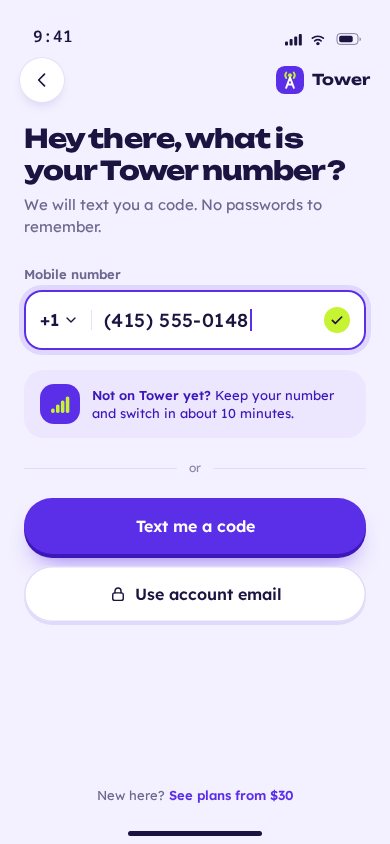
A sign in screen from Tower, a lifestyle app template in a Playful style. Screen 2 of 25.
Tower is a complete mobile carrier app: welcome, sign in with a phone number and a one time code, a home with the data ring for this cycle, minutes, texts and hotspot, usage by day and by app, plan details, plans to switch to, data top ups with checkout and a success screen, bills with a line by line breakdown and pay bill, roaming with a travel pass, family lines with limits, eSIM setup with a QR code, a phone shop with a phone page, live network status on a map, a support chat, notifications, account and settings. Lilac and white with signal violet, electric lime and a pop of pink.
| Detail | Value |
|---|---|
| Screen type | Sign in |
| App | Tower: Mobile plan, data and bills |
| Category | Lifestyle |
| Design language | Playful, light |
| Type | Unbounded for headings, Lexend for text |
| Colours | #f3f0ff background, #ffffff surface, #1b1340 text, #6e6890 text-muted, #5b2ee8 accent, #ffffff accent-contrast, #c6f432 secondary, #e6e0fa border, #ff4f6d danger |
What this screen says
- Tower
- Hey there, what is your Tower number?
- We will text you a code. No passwords to remember.
- Mobile number
- (415) 555-0148
- Not on Tower yet? Keep your number and switch in about 10 minutes.
- or
- Text me a code
- Use account email
- New here? See plans from $30
Around it in Tower
More sign in and sign up screens
- Shelf Sign in: Reading tracker and book club
- Marquee Sign in: Cinema tickets and watchlist
- Handy Sign in: Home services
- Tasker Sign in: Book and do local odd jobs
- Toolbox Sign in: Hardware store and project lists
- Brief Sign in: News in sixty words
- Kibble Sign in: Pet supplies and autoship
- Filmlog Sign up: Film diary and reviews
- Guardrail Sign in: Parental controls and screen time
- Collar Sign in: GPS pet tracker
- Postage Sign in: Send parcels and find drop-off points
- Specs Sign in: Glasses with virtual try-on
Every lifestyle app sign in screen
What makes a good login screen
- Offer the fastest option first. Sign in with Apple, Google or a passkey takes one tap. If you support them, put them above the email form. Apple asks apps that use a third-party login like Google to also offer an equivalent privacy-focused option, such as Sign in with Apple.
- Separate sign in from sign up clearly. Use different headings and buttons, and a clear link to switch. People who already have an account should never end up creating a second one by accident.
- Use the right keyboard and autofill. Email fields should open the email keyboard and support password managers and one-time code autofill. Small details, big difference in how many people get through.
- Write errors that help. "That password doesn't match this email" is better than "Error 401". Keep what people typed so they only fix the part that was wrong.
The full login screen guide and every example
Remix Tower free: describe your own app and it is drawn in this design. Or get its files from $10: Figma, React Native, SwiftUI, Flutter and HTML.