Templates · Detail screens · Lifestyle app · Grain
Grain Film stock screen
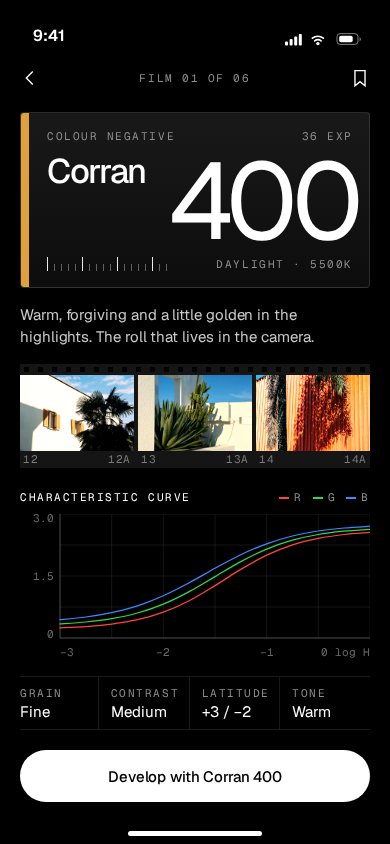
A detail screen from Grain, a camera and photo editor app template in a Dark-first style. Screen 12 of 25.
Grain is a complete camera and photo editor: welcome and sign in, a library kept as rolls and contact sheets, albums, a manual camera with level, peaking and an exposure dial, a photo viewer with EXIF, histogram and a drawn map, editing for light, colour, curves, crop and masks, a browser of six invented film stocks with their characteristic curves, compare, versions, export and a success screen, a community feed with photographer profiles and search, a year of shooting stats, a Pro plan, notifications, profile and settings.
| Detail | Value |
|---|---|
| Screen type | Detail |
| App | Grain: Camera and photo editor |
| Category | Lifestyle |
| Design language | Dark-first, dark |
| Type | Geist |
| Colours | #000000 background, #161616 surface, #ffffff text, #8f8f8f text-muted, #ffffff accent, #000000 accent-contrast, #5c5c5c secondary, #262626 border, #ff3b30 danger |
What this screen says
- Film 01 of 06
- Colour negative 36 exp
- Corran
- 400Daylight · 5500K
- Warm, forgiving and a little golden in the highlights. The roll that lives in the camera.
- 1212A 1313A 1414A
- Characteristic curve RGB
- Grain Fine
- Contrast Medium
- Latitude +3 / −2
- Tone Warm
- Develop with Corran 400
Around it in Grain
More detail screens
- Fern Plant: Plant care
- Doorstep Listing: Homes for sale and rent
- Rewear Item: Secondhand fashion marketplace
- Laced Shoe: Sneaker drops and raffles
- Gloss Salon: Salon and spa booking
- Vow Task: Wedding planner
- Drizzle Hourly: Weather with living skies
- Byline Article: Daily news reader
- Shelf Book: Reading tracker and book club
- Marquee Film: Cinema tickets and watchlist
- Handy Cleaning: Home services
- Tasker Furniture assembly: Book and do local odd jobs
Every lifestyle app detail screen
What makes a good detail screen
- Lead with what identifies the item. A large image or title, the price or status, and the key facts at the top. People should know they are in the right place at a glance.
- Keep the main action visible. A sticky bottom button for Add to cart, Book or Play stays reachable while people scroll through details.
- Order information by importance. The facts that decide the choice come first; reviews, specifications and fine print further down.
- Use progressive disclosure. Long descriptions, specifications and policies can expand on tap rather than filling the screen.
The full detail screen guide and every example
Remix Grain free: describe your own app and it is drawn in this design. Or get its files from $10: Figma, React Native, SwiftUI, Flutter and HTML.