Templates · List and feed screens · Finance app · Giftly
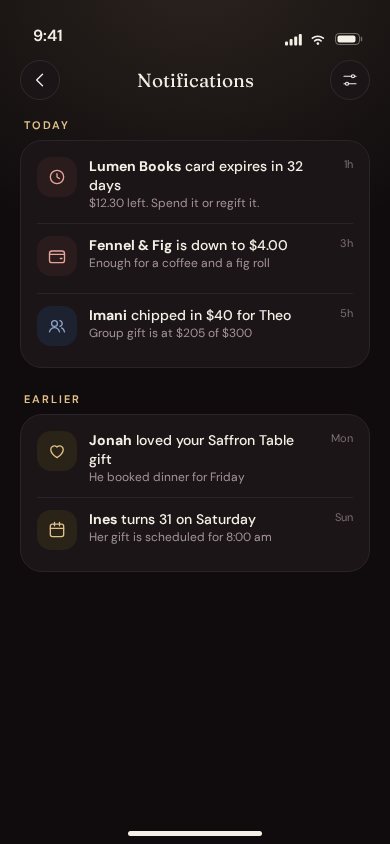
Giftly Notifications screen
A list screen from Giftly, a finance app template in a Luxury style. Screen 22 of 25.
Giftly is a complete gift card app: welcome and sign in, a home with the wallet balance, quick actions, occasions and upcoming birthdays, browse by occasion and shop, a shop page, card design, amount, a video or written note, scheduled delivery by text or email, checkout and a sent confirmation, the recipient's unwrap reveal, a wallet of stored cards with balances, a card with its history, a barcode to redeem at the till, scanning a plastic card in and its added state, a group gift and chip in, spending insights, sent gifts, reminders for low balances and expiry, a Reserve plan, profile and settings. Plum black with champagne gold and a soft rose.
| Detail | Value |
|---|---|
| Screen type | List |
| App | Giftly: Gift cards, sent and stored |
| Category | Finance |
| Design language | Luxury, dark |
| Type | Fraunces for headings, DM Sans for text |
| Colours | #100c0e background, #1b1518 surface, #f6efe6 text, #a39398 text-muted, #e2c28a accent, #1a1206 accent-contrast, #e7a59a secondary, #2c2327 border, #ff7a6e danger |
What this screen says
- Notifications
- Today
- Lumen Books card expires in 32 days
- $12.30 left. Spend it or regift it.
- 1h
- Fennel & Fig is down to $4.00
- Enough for a coffee and a fig roll
- 3h
- Imani chipped in $40 for Theo
- Group gift is at $205 of $300
- 5h
- Earlier
- Jonah loved your Saffron Table gift
- He booked dinner for Friday
- Mon
- Ines turns 31 on Saturday
- Her gift is scheduled for 8:00 am
- Sun
Around it in Giftly
More list and feed screens
- Fathom Notifications: Crypto wallet
- Marigold Notifications: Mobile banking
- Zentra Activity: Crypto trading
- Payday Pay runs: Payroll for small teams
- Roundup Round ups: Invest your spare change
- Envelope Quick assign: Give every dollar a job
- Recur Subscriptions: Track and cancel subscriptions
- Keel Cards: Corporate cards and spend controls
- Zap Activity: Pay friends with a note
- Billfold Transactions: Cards, passes and tickets wallet
- Payly Plans: UPI payments, recharges and bills
- Crest Cards: Credit card bills and rewards
What makes a good list screen
- Show what people need to decide. Each row should carry just enough to choose: a title, one or two details and a status. Everything else belongs on the detail screen.
- Keep rows consistent. The same information in the same place on every row lets people scan down a column instead of reading each item.
- Group with headings. Dates, categories or status headings break long lists into chunks people can skip through.
- Make common actions quick. Swipe actions, a checkbox or a heart on the row save opening the item for small tasks.
The full list screen guide and every example
Remix Giftly free: describe your own app and it is drawn in this design. Or get its files from $10: Figma, React Native, SwiftUI, Flutter and HTML.