Templates · Live tracking screens · Travel app · Fuelup
Fuelup Charging screen
A tracking screen from Fuelup, a travel app template in a Playful style. Screen 18 of 25.
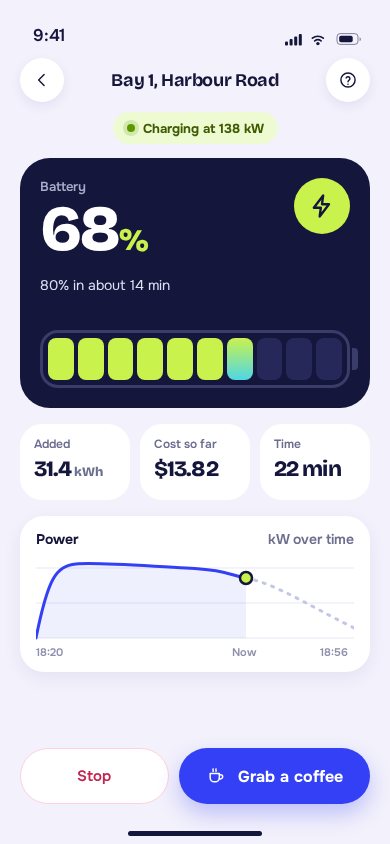
Fuelup is a complete fuel station app: welcome, sign in with a texted code, adding your car, a home with the nearest station and its prices, a map of stations with price pins, a station page, a ranked price list, picking a pump, choosing how much to fill, confirming the hold, a live fuelling gauge and a receipt, car wash programs, a wash pass plan and a bay code, EV charging bays and a live charging session, an order ahead shop, rewards with tiers, offers, monthly spending, notifications, profile and settings. Lavender and white with cobalt, lime and aqua.
| Detail | Value |
|---|---|
| Screen type | Tracking |
| App | Fuelup: Pay at the pump and car wash |
| Category | Travel |
| Design language | Playful, light |
| Type | Bricolage Grotesque for headings, Onest for text |
| Colours | #f3f1fb background, #ffffff surface, #15163b text, #6c6e8f text-muted, #3340f5 accent, #ffffff accent-contrast, #c9f24d secondary, #e4e2f2 border, #e8456f danger |
What this screen says
- Bay 1, Harbour Road
- Charging at 138 kW
- Battery
- 80% in about 14 min
- Added31.4 kWh
- Cost so far$13.82
- Time22 min
- PowerkW over time
- Stop
- Grab a coffee
Around it in Fuelup
More live tracking screens
- Caravan On the road: Campervan rental and road trips
- Layover Terminal map: Airport guide, gates and lounges
- Permit Application status: Visas and travel documents wallet
- Backroad Drive: Road trip planner with stops
- Bunk On the way: Hostels and backpacker meetups
- Piazza Walking: Self-guided city walking tours
- Fjord Live voyage: Cruise companion on board
- Atlas Navigation: Maps and navigation
- Aloft Live flight: Flight tracker
- Hail Finding a driver: Ride hailing
- Volta Charging: EV charging
- Museo Find a gallery: Museum guide
Every travel app tracking screen
What makes a good live tracking screen
- The live number is the hero. Arrival time, pace, distance or time left, in large type at the top or centre.
- Show status in words. "Driver is 3 minutes away" or "Halfway there" alongside the map or chart.
- Make it readable while moving. Large numbers, high contrast and big buttons for pause, stop or call.
- Keep updates calm. Smooth movement on the map and steady numbers; jumpy updates feel broken.
The full live tracking screen guide and every example
Remix Fuelup free: describe your own app and it is drawn in this design. Or get its files from $10: Figma, React Native, SwiftUI, Flutter and HTML.