Templates · Detail screens · Finance app · Folio
Folio ETF screen
A detail screen from Folio, a stocks and ETF investing app template in a Minimal style. Screen 14 of 25.
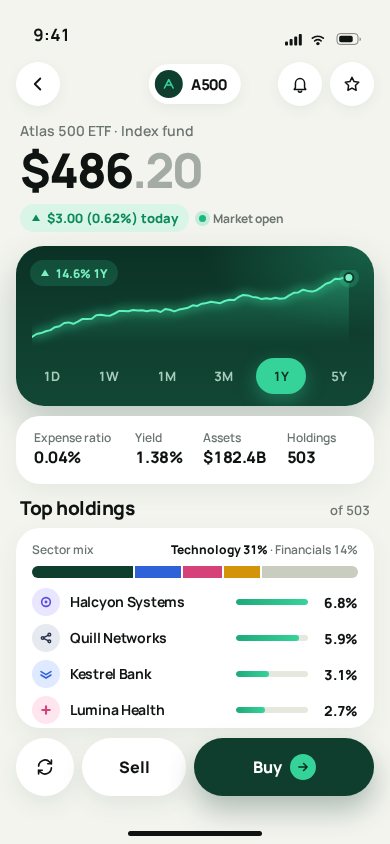
Folio is a complete investing app: welcome, sign in, identity check, funding, a portfolio home with a touchable day chart and holdings, stock and ETF pages, a candle chart, a number pad order ticket with review and confirmation, watchlist, discover with movers, sectors and themes, search, positions, orders, recurring buys, an earnings calendar, news, price alerts, transfers, statements and tax, a premium plan, account and settings. Bone and white with deep forest green, glowing mint and a coral for losses.
| Detail | Value |
|---|---|
| Screen type | Detail |
| App | Folio: Stocks and ETF investing |
| Category | Finance |
| Design language | Minimal, light |
| Type | Manrope |
| Colours | #f3f4ee background, #ffffff surface, #0f1412 text, #6b756f text-muted, #35d39a accent, #0a2e22 accent-contrast, #0f3d2e secondary, #e6e8de border, #f0563f danger |
What this screen says
- A500
- Atlas 500 ETF · Index fund
- $3.00 (0.62%) today Market open
- 14.6% 1Y
- 1D 1W 1M 3M 1Y 5Y
- Expense ratio
- Yield
- Assets
- $182.4B
- Holdings
- Top holdings
- of 503
- Sector mix Technology 31% · Financials 14%
- Halcyon Systems
- Quill Networks
- Kestrel Bank
- Lumina Health
- Sell
- Buy
Around it in Folio
More detail screens
- Piggy Chore: Pocket money for kids
- Settle Receipt: Bill payments and banking
- Fathom Coin: Crypto wallet
- Marigold Card details: Mobile banking
- Zentra Coin: Crypto trading
- Payday Pay run: Payroll for small teams
- Roundup Purchase: Invest your spare change
- Envelope Category: Give every dollar a job
- Recur Subscription: Track and cancel subscriptions
- Keel Card: Corporate cards and spend controls
- Giftly Shop: Gift cards, sent and stored
- Zap Wallet: Pay friends with a note
Every finance app detail screen
What makes a good detail screen
- Lead with what identifies the item. A large image or title, the price or status, and the key facts at the top. People should know they are in the right place at a glance.
- Keep the main action visible. A sticky bottom button for Add to cart, Book or Play stays reachable while people scroll through details.
- Order information by importance. The facts that decide the choice come first; reviews, specifications and fine print further down.
- Use progressive disclosure. Long descriptions, specifications and policies can expand on tap rather than filling the screen.
The full detail screen guide and every example
Remix Folio free: describe your own app and it is drawn in this design. Or get its files from $10: Figma, React Native, SwiftUI, Flutter and HTML.