Templates · Detail screens · Finance app · Piggy
Piggy Chore screen
A detail screen from Piggy, a pocket money for kids app template in a Playful style. Screen 6 of 25.
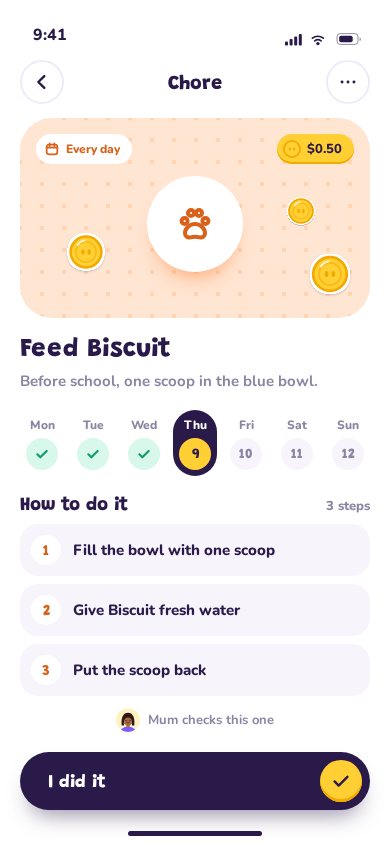
Piggy is a complete pocket money app for a child and their grown ups: welcome, parent sign in and a kid PIN, a home with spend, save and give money, chores with rewards and a done moment, weekly allowance with a split, save jars with goals, adding money and starting a jar, asking to spend, learn cards with a quiz, a sticker book of badges, an activity dashboard, a parent view with approvals, a family plan, notifications, profile and settings. Candy pink, lemon, mint, sky and grape on white, with a drawn pig mascot and sticker badges.
| Detail | Value |
|---|---|
| Screen type | Detail |
| App | Piggy: Pocket money for kids |
| Category | Finance |
| Design language | Playful, light |
| Type | Grandstander for headings, Nunito for text |
| Colours | #ffffff background, #f7f4fc surface, #2a1a4a text, #8b84a3 text-muted, #ff5c9f accent, #ffffff accent-contrast, #ffcf33 secondary, #efeaf8 border, #ff4d5e danger |
What this screen says
- Chore
- Every day $0.50
- Feed Biscuit
- Before school, one scoop in the blue bowl.
- Mon
- Tue
- Wed
- Thu9
- Fri10
- Sat11
- Sun12
- How to do it3 steps
- 1Fill the bowl with one scoop
- 2Give Biscuit fresh water
- 3Put the scoop back
- Mum checks this one
- I did it
Around it in Piggy
More detail screens
- Payly Chat: UPI payments, recharges and bills
- Crest Card: Credit card bills and rewards
- Storefront Order: Run your online store
- Bastion Checking: Everyday banking from a big bank
- Later Store: Buy now, pay in four
- Standing Card use: Credit score and reports
- Accrue Pot: Retirement and pension planner
- Levy Payment: Taxes for freelancers
- Bullion Gold: Gold and silver savings
- Wage Shift: Get paid as you work
- Keystone Loan: Mortgage and home loan tracker
- Rebate Card: Cashback card and rewards
Every finance app detail screen
What makes a good detail screen
- Lead with what identifies the item. A large image or title, the price or status, and the key facts at the top. People should know they are in the right place at a glance.
- Keep the main action visible. A sticky bottom button for Add to cart, Book or Play stays reachable while people scroll through details.
- Order information by importance. The facts that decide the choice come first; reviews, specifications and fine print further down.
- Use progressive disclosure. Long descriptions, specifications and policies can expand on tap rather than filling the screen.
The full detail screen guide and every example
Remix Piggy free: describe your own app and it is drawn in this design. Or get its files from $10: Figma, React Native, SwiftUI, Flutter and HTML.