Templates · Detail screens · Finance app · Settle
Settle Receipt screen
A detail screen from Settle, a bill payments and banking app template in a Minimal style. Screen 14 of 25.
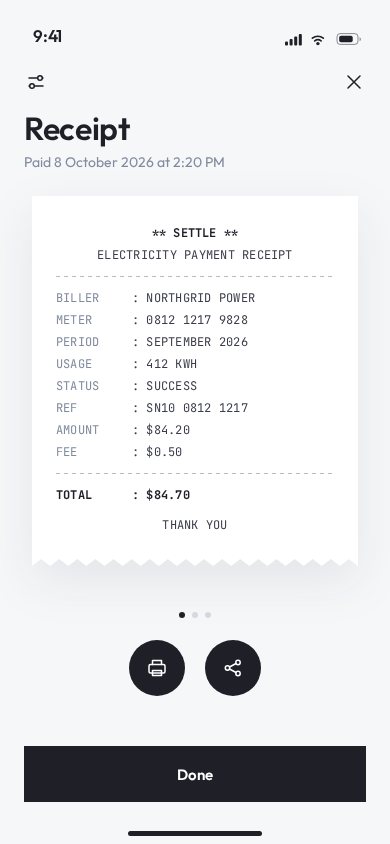
Settle is a complete bill payment app: onboarding, sign in, a passcode, a home with the wallet balance and every service, top-ups with a keypad, mobile credit and data plans, electricity and other bills with review and a printed style receipt, transfers, scan to pay, history, monthly stats, saved billers, reminders, a plus plan, profile and settings. Crisp white and ink black with square corners, round icons and a pastel gradient of lilac, mint, peach and coral.
| Detail | Value |
|---|---|
| Screen type | Detail |
| App | Settle: Bill payments and banking |
| Category | Finance |
| Design language | Minimal, light |
| Type | Outfit |
| Colours | #ffffff background, #f6f7f9 surface, #1f1f27 text, #808b9e text-muted, #1f1f27 accent, #ffffff accent-contrast, #fb8468 secondary, #edf1f8 border, #ef4d4d danger |
What this screen says
- Receipt
- Paid 8 October 2026 at 2:20 PM
- ** Settle **
- Electricity payment receipt
- Biller : Northgrid Power
- Meter : 0812 1217 9828
- Period : September 2026
- Usage : 412 kWh
- Status : Success
- Ref : SN10 0812 1217
- Amount : $84.20
- Fee : $0.50
- Total : $84.70
- Thank you
- Done
Around it in Settle
More detail screens
- Lease Rent: Your tenancy, drawn to plan
- Claim Receipt: Expenses, filed like a till receipt
- Tally Groceries: Monthly budgeting
- Divvy Group: Split bills with friends
- Ticker Stock: Stock investing
- Burrow Lisbon trip: Shared savings pots
- Remit Receipt: International money transfer
- Piggy Chore: Pocket money for kids
- Fathom Coin: Crypto wallet
- Marigold Card details: Mobile banking
- Zentra Coin: Crypto trading
- Payday Pay run: Payroll for small teams
Every finance app detail screen
What makes a good detail screen
- Lead with what identifies the item. A large image or title, the price or status, and the key facts at the top. People should know they are in the right place at a glance.
- Keep the main action visible. A sticky bottom button for Add to cart, Book or Play stays reachable while people scroll through details.
- Order information by importance. The facts that decide the choice come first; reviews, specifications and fine print further down.
- Use progressive disclosure. Long descriptions, specifications and policies can expand on tap rather than filling the screen.
The full detail screen guide and every example
Remix Settle free: describe your own app and it is drawn in this design. Or get its files from $10: Figma, React Native, SwiftUI, Flutter and HTML.