Templates · List and feed screens · Lifestyle app · Fetch
Fetch Reviews screen
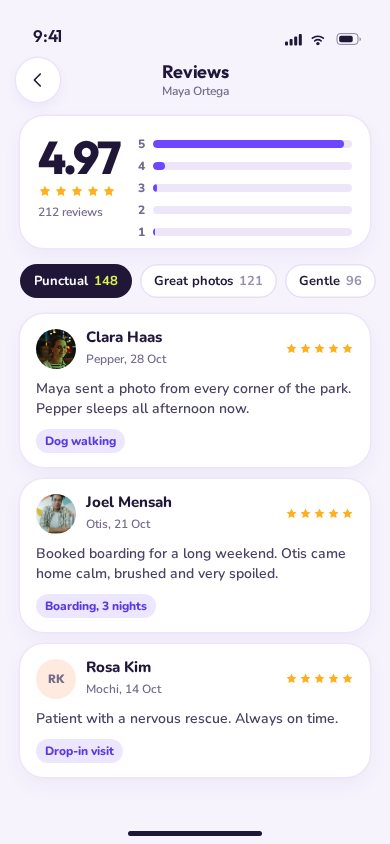
A list screen from Fetch, a dog walkers and pet sitters app template in a Playful style. Screen 9 of 25.
Fetch is a complete pet care marketplace: welcome, sign in and a pet profile setup, a home with the walk in progress, search by service, dates and size, sitter results in a list and on a map, a sitter profile with services and reviews, booking with a calendar, checkout and a confirmation, bookings, a live walk with route and bathroom log, photo updates, a report card with a tip, inbox and chat, a pet profile, weekly activity, notifications, a Plus plan, profile and settings. Lilac and white with violet and tennis ball chartreuse.
| Detail | Value |
|---|---|
| Screen type | List |
| App | Fetch: Dog walkers and pet sitters |
| Category | Lifestyle |
| Design language | Playful, light |
| Type | Outfit for headings, Nunito for text |
| Colours | #f6f3fd background, #ffffff surface, #1f1638 text, #756b8c text-muted, #6c47ff accent, #ffffff accent-contrast, #d9f24f secondary, #ece6f8 border, #ff5a6a danger |
What this screen says
- ReviewsMaya Ortega
- 212 reviews
- Punctual 148 Great photos 121 Gentle 96
- Clara HaasPepper, 28 Oct
- Maya sent a photo from every corner of the park. Pepper sleeps all afternoon now.Dog walking
- Joel MensahOtis, 21 Oct
- Booked boarding for a long weekend. Otis came home calm, brushed and very spoiled.Boarding, 3 nights
- RK
- Rosa KimMochi, 14 Oct
- Patient with a nervous rescue. Always on time.Drop-in visit
Around it in Fetch
More list and feed screens
- Splice Add media: Video editor for short clips
- Blush Lipstick: Beauty and makeup shopping
- Flatpack Room: Furniture store with room previews
- Column Comments: Newsletters and independent writers
- Forecourt Results: Buy and sell used cars
- Tower Bills: Mobile plan, data and bills
- Haul Flash sale: Bargain fashion and finds
- Muse Styles: AI image studio
- Admit This weekend: Events and tickets near you
- Arcade Autumn sale: Game store, library and friends
- Natal Aspects: Birth charts and daily astrology
- Sillage Wardrobe: Fragrance wardrobe
Every lifestyle app list screen
What makes a good list screen
- Show what people need to decide. Each row should carry just enough to choose: a title, one or two details and a status. Everything else belongs on the detail screen.
- Keep rows consistent. The same information in the same place on every row lets people scan down a column instead of reading each item.
- Group with headings. Dates, categories or status headings break long lists into chunks people can skip through.
- Make common actions quick. Swipe actions, a checkbox or a heart on the row save opening the item for small tasks.
The full list screen guide and every example
Remix Fetch free: describe your own app and it is drawn in this design. Or get its files from $10: Figma, React Native, SwiftUI, Flutter and HTML.