Templates · List and feed screens · Lifestyle app · Sillage
Sillage Wardrobe screen
A list screen from Sillage, a fragrance wardrobe app template in a Minimal style. Screen 5 of 25.
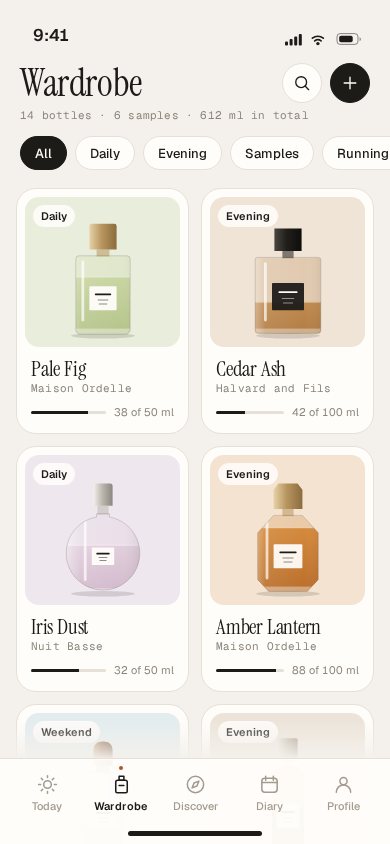
Sillage is a complete fragrance wardrobe: welcome and a scent profile, sign in, a weather aware pick for today, the wardrobe shelf, fragrance pages with a note pyramid, ingredient notes, a live wear tracker with a top, heart and base curve, a wear log and a calendar diary, discover, search, perfume houses, a bottle scanner, adding a bottle with its fill level, layering, insights, discovery sets with a bag and an order confirmation, a wishlist, notifications, Sillage Plus, profile and settings. Vellum, ivory and ink with one burnt amber accent.
| Detail | Value |
|---|---|
| Screen type | List |
| App | Sillage: Fragrance wardrobe |
| Category | Lifestyle |
| Design language | Minimal, light |
| Type | Instrument Serif for headings, Geist for text |
| Colours | #f4f1ec background, #fffdfa surface, #1d1b18 text, #8c857b text-muted, #b4532a accent, #fffdfa accent-contrast, #6f7d5c secondary, #e6e0d6 border, #c2412d danger |
What this screen says
- Wardrobe
- 14 bottles · 6 samples · 612 ml in total
- All Daily Evening Samples Running low
- Daily
- Pale Fig
- Maison Ordelle
- 38 of 50 ml
- Evening
- Cedar Ash
- Halvard and Fils
- 42 of 100 ml
- Iris Dust
- Nuit Basse
- 32 of 50 ml
- Amber Lantern
- 88 of 100 ml
- Weekend
- Salt Bloom
- Corvo Parfums
- 15 of 50 ml
- Smoked Tea
- Kesh and Morrow
- 28 of 50 ml
- Today
- Discover
- Diary
- Profile
Around it in Sillage
More list and feed screens
- Marquee Reviews: Cinema tickets and watchlist
- Handy Choose a pro: Home services
- Tasker Choose tasker: Book and do local odd jobs
- Toolbox Questions: Hardware store and project lists
- Brief Morning brief: News in sixty words
- Kibble Reviews: Pet supplies and autoship
- Filmlog Cast and crew: Film diary and reviews
- Guardrail App limits: Parental controls and screen time
- Collar Safe zones: GPS pet tracker
- Postage Track: Send parcels and find drop-off points
- Specs Home try-on: Glasses with virtual try-on
- Circuit Deals: Electronics store with trade-in and repairs
Every lifestyle app list screen
What makes a good list screen
- Show what people need to decide. Each row should carry just enough to choose: a title, one or two details and a status. Everything else belongs on the detail screen.
- Keep rows consistent. The same information in the same place on every row lets people scan down a column instead of reading each item.
- Group with headings. Dates, categories or status headings break long lists into chunks people can skip through.
- Make common actions quick. Swipe actions, a checkbox or a heart on the row save opening the item for small tasks.
The full list screen guide and every example
Remix Sillage free: describe your own app and it is drawn in this design. Or get its files from $10: Figma, React Native, SwiftUI, Flutter and HTML.