Templates · Detail screens · Finance app · Envelope
Envelope Account screen
A detail screen from Envelope, a finance app template in a Minimal style. Screen 11 of 25.
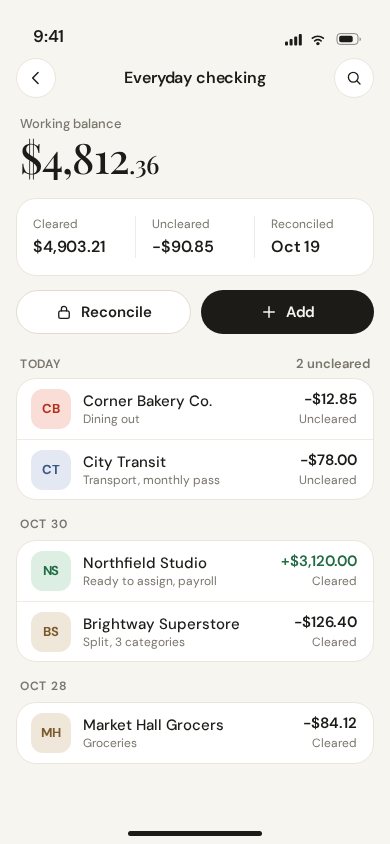
Envelope is a complete zero based budgeting app: welcome and category setup, sign in, a monthly budget with money ready to assign and category groups, a category with assigned, activity and available, assigning on a keypad, moving money to cover overspending, targets and quick assign, accounts and an account register, a transaction, adding and splitting transactions, reconciling with a confirmation, spending, net worth and age of money reports, search, scheduled transactions, notifications, a membership plan, profile and settings. Warm paper and ink with one vermilion accent.
| Detail | Value |
|---|---|
| Screen type | Detail |
| App | Envelope: Give every dollar a job |
| Category | Finance |
| Design language | Minimal, light |
| Type | Playfair Display for headings, DM Sans for text |
| Colours | #f7f5f0 background, #ffffff surface, #1c1b18 text, #7a766d text-muted, #e2552d accent, #ffffff accent-contrast, #1c1b18 secondary, #ebe6dc border, #c8392b danger |
What this screen says
- Everyday checking
- Working balance
- Cleared
- Uncleared
- Reconciled
- Oct 19
- Reconcile
- Add
- Today
- 2 uncleared
- CB
- Corner Bakery Co.
- Dining out
- -$12.85Uncleared
- CT
- City Transit
- Transport, monthly pass
- -$78.00Uncleared
- Oct 30
- NS
- Northfield Studio
- Ready to assign, payroll
- +$3,120.00Cleared
- BS
- Brightway Superstore
- Split, 3 categories
- -$126.40Cleared
- Oct 28
- MH
- Market Hall Grocers
Around it in Envelope
More detail screens
- Claim Receipt: Expenses, filed like a till receipt
- Tally Groceries: Monthly budgeting
- Divvy Group: Split bills with friends
- Ticker Stock: Stock investing
- Burrow Lisbon trip: Shared savings pots
- Remit Receipt: International money transfer
- Piggy Chore: Pocket money for kids
- Settle Receipt: Bill payments and banking
- Fathom Coin: Crypto wallet
- Marigold Card details: Mobile banking
- Zentra Coin: Crypto trading
- Payday Pay run: Payroll for small teams
Every finance app detail screen
What makes a good detail screen
- Lead with what identifies the item. A large image or title, the price or status, and the key facts at the top. People should know they are in the right place at a glance.
- Keep the main action visible. A sticky bottom button for Add to cart, Book or Play stays reachable while people scroll through details.
- Order information by importance. The facts that decide the choice come first; reviews, specifications and fine print further down.
- Use progressive disclosure. Long descriptions, specifications and policies can expand on tap rather than filling the screen.
The full detail screen guide and every example
Remix Envelope free: describe your own app and it is drawn in this design. Or get its files from $10: Figma, React Native, SwiftUI, Flutter and HTML.