Templates · Sign in and sign up screens · Lifestyle app · Drizzle
Drizzle Create account screen
A sign in screen from Drizzle, a weather with living skies app template in a Glass style. Screen 4 of 25.
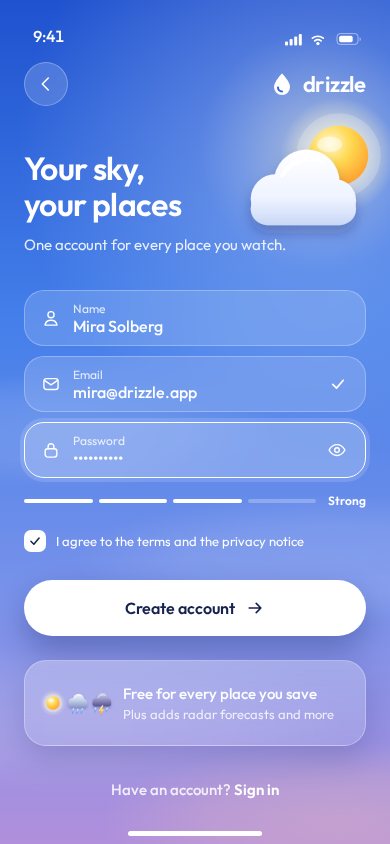
Drizzle is a complete weather app: welcome, location access, sign in and a code, a home with now, the next hours and four metric tiles, an hourly chart, a 10 day outlook, a day in detail, rain in the next hours, a live radar map with a timeline, air quality, sun and moon, saved places that each wear their own sky, adding a place, a city at night, severe alerts, home screen widgets, a Plus plan, notifications, profile and settings. The sky behind every screen changes with the conditions it reports.
| Detail | Value |
|---|---|
| Screen type | Sign in |
| App | Drizzle: Weather with living skies |
| Category | Lifestyle |
| Design language | Glass, dark |
| Type | Outfit |
| Colours | #2f63d8 background, #5f8eee surface, #ffffff text, #d5e0fb text-muted, #ffd666 accent, #17234f accent-contrast, #8fd3ff secondary, #9db8f5 border, #ff7a6b danger |
What this screen says
- drizzle
- Your sky,
- your places
- One account for every place you watch.
- Name
- Mira Solberg
- mira@drizzle.app
- Password
- ••••••••••
- Strong
- I agree to the terms and the privacy notice
- Create account
- Free for every place you save
- Plus adds radar forecasts and more
- Have an account? Sign in
Around it in Drizzle
More sign in and sign up screens
- Torque Sign in: The workshop manual for your own car
- Vetly Sign in: Pet health record
- Stitch Sign in: A knitting companion drawn as one big knitting chart
- Roost Sign in: Your shared house, stuck to the fridge door
- Trellis Sign in: Vegetable garden planner
- Grain Sign in: Camera and photo editor
- Posy Sign in: Flower delivery and weekly stems
- Fern Sign in: Plant care
- Doorstep Sign in: Homes for sale and rent
- Rewear Sign in: Secondhand fashion marketplace
- Laced Sign in: Sneaker drops and raffles
- Gloss Sign in: Salon and spa booking
Every lifestyle app sign in screen
What makes a good login screen
- Offer the fastest option first. Sign in with Apple, Google or a passkey takes one tap. If you support them, put them above the email form. Apple asks apps that use a third-party login like Google to also offer an equivalent privacy-focused option, such as Sign in with Apple.
- Separate sign in from sign up clearly. Use different headings and buttons, and a clear link to switch. People who already have an account should never end up creating a second one by accident.
- Use the right keyboard and autofill. Email fields should open the email keyboard and support password managers and one-time code autofill. Small details, big difference in how many people get through.
- Write errors that help. "That password doesn't match this email" is better than "Error 401". Keep what people typed so they only fix the part that was wrong.
The full login screen guide and every example
Remix Drizzle free: describe your own app and it is drawn in this design. Or get its files from $10: Figma, React Native, SwiftUI, Flutter and HTML.