Templates · Sign in and sign up screens · Lifestyle app · Laced
Laced Sign in screen
A sign in screen from Laced, a sneaker drops and raffles app template in a Brutalist style. Screen 2 of 25.
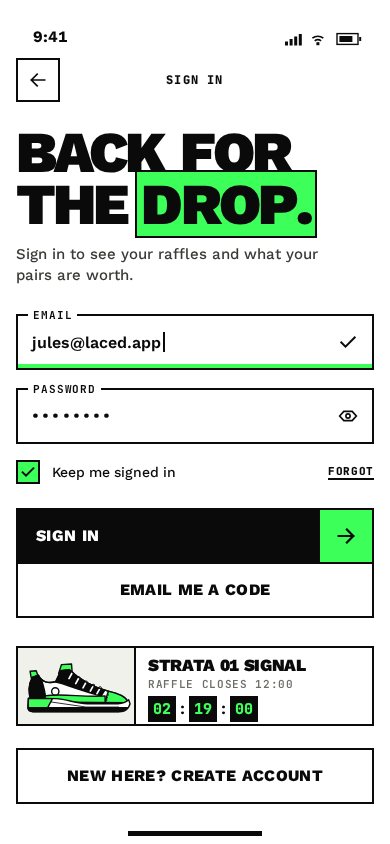
Laced is a complete sneaker drops app: welcome, sign in, a code and size setup, a home with the next drop and a countdown, a drops calendar, the shoe page with sizes, a size guide, raffle entry and results, checkout, order tracking, search, a collection of owned pairs with resale value and a value chart, release alerts, a Pro plan, profile and settings. Everything sits on a hard black grid with neon green for whatever is live, selected or up in value.
| Detail | Value |
|---|---|
| Screen type | Sign in |
| App | Laced: Sneaker drops and raffles |
| Category | Lifestyle |
| Design language | Brutalist, light |
| Type | Work Sans |
| Colours | #ffffff background, #f1f1ec surface, #0a0a0a text, #6e6e68 text-muted, #3dff5a accent, #0a0a0a accent-contrast, #0a0a0a secondary, #0a0a0a border, #ff3d1f danger |
What this screen says
- Sign in
- Back for
- the drop.
- Sign in to see your raffles and what your pairs are worth.
- jules@laced.app
- Password
- ••••••••
- Keep me signed in Forgot
- Email me a code
- Strata 01 Signal
- Raffle closes 12:00
- New here? Create account
Around it in Laced
More sign in and sign up screens
- Brief Sign in: News in sixty words
- Kibble Sign in: Pet supplies and autoship
- Filmlog Sign up: Film diary and reviews
- Guardrail Sign in: Parental controls and screen time
- Collar Sign in: GPS pet tracker
- Postage Sign in: Send parcels and find drop-off points
- Specs Sign in: Glasses with virtual try-on
- Circuit Sign in: Electronics store with trade-in and repairs
- Provenance Sign in: Authenticated luxury resale
- Gavel Sign in: Live online auctions
- Tidy Sign in: Book home cleaners
- Dorm Sign in: Find student housing
Every lifestyle app sign in screen
What makes a good login screen
- Offer the fastest option first. Sign in with Apple, Google or a passkey takes one tap. If you support them, put them above the email form. Apple asks apps that use a third-party login like Google to also offer an equivalent privacy-focused option, such as Sign in with Apple.
- Separate sign in from sign up clearly. Use different headings and buttons, and a clear link to switch. People who already have an account should never end up creating a second one by accident.
- Use the right keyboard and autofill. Email fields should open the email keyboard and support password managers and one-time code autofill. Small details, big difference in how many people get through.
- Write errors that help. "That password doesn't match this email" is better than "Error 401". Keep what people typed so they only fix the part that was wrong.
The full login screen guide and every example
Remix Laced free: describe your own app and it is drawn in this design. Or get its files from $10: Figma, React Native, SwiftUI, Flutter and HTML.