Templates · Paywall screens · Lifestyle app · Dorm
Dorm Plus screen
A paywall screen from Dorm, a find student housing app template in a Gen Z style. Screen 22 of 25.
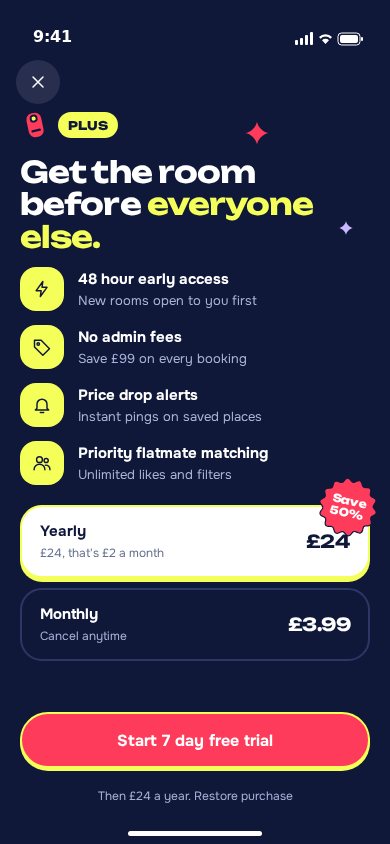
Dorm is a complete student housing app: welcome, pick your university, sign in, a home that picks up your application, search with filters, a price pin map, a property page with room types, amenities and commute times, a room page with a floor plan, a virtual tour, a commute planner, compare, saved places, a three step application, deposit checkout and a booking confirmed key fob, flatmate matching and a flatmate profile, chat with the property team, payments, a move in checklist, Dorm Plus, notifications, profile and settings. Sky milk and white with cherry, lemon, lilac and ink.
| Detail | Value |
|---|---|
| Screen type | Paywall |
| App | Dorm: Find student housing |
| Category | Lifestyle |
| Design language | Gen Z, light |
| Type | Unbounded for headings, Onest for text |
| Colours | #edf2ff background, #ffffff surface, #10183a text, #66708f text-muted, #ff3b5c accent, #ffffff accent-contrast, #f4ff5a secondary, #dbe3f6 border, #22c58b success, #c9b8ff tertiary |
What this screen says
- PLUS
- Get the room before everyone else.
- 48 hour early accessNew rooms open to you first
- No admin feesSave £99 on every booking
- Price drop alertsInstant pings on saved places
- Priority flatmate matchingUnlimited likes and filters
- Yearly£24, that's £2 a month
- Save
- MonthlyCancel anytime
- Start 7 day free trial
- Then £24 a year. Restore purchase
Around it in Dorm
More paywall screens
- Brief Plus: News in sixty words
- Kibble Club: Pet supplies and autoship
- Filmlog Pro: Film diary and reviews
- Guardrail Plus: Parental controls and screen time
- Collar Plans: GPS pet tracker
- Postage Plus: Send parcels and find drop-off points
- Specs Club: Glasses with virtual try-on
- Circuit Membership: Electronics store with trade-in and repairs
- Provenance Circle: Authenticated luxury resale
- Gavel Pass: Live online auctions
- Tidy Club: Book home cleaners
- Hem Plus: Tailoring and alterations, collected
Every lifestyle app paywall screen
What makes a good paywall screen
- Lead with the outcome, not the feature list. The headline should say what changes for the person: "Train smarter every week" beats "Unlock Premium". Three to five benefits underneath are enough; more turns into a wall of ticks nobody reads.
- Show the real price, period and trial terms. State the price, how often it renews and when a free trial turns into a charge, near the button. Apple's App Store guideline 3.1.2 asks subscription apps to make this clear before purchase, and Google Play has similar rules.
- One primary button. The main call to action should be impossible to miss and say what happens: "Start 7-day free trial" or "Subscribe for $4.99/month". A second plan choice is fine; a second competing button is not.
- Make the plans easy to compare. When you offer monthly and yearly, show both prices in the same unit (per month or per week) and mark the saving on the yearly plan in plain numbers, not just a badge.
The full paywall screen guide and every example
Remix Dorm free: describe your own app and it is drawn in this design. Or get its files from $10: Figma, React Native, SwiftUI, Flutter and HTML.