Templates · Profile screens · Productivity app · Docket
Docket Profile screen
A profile screen from Docket, a task and sprint planner app template in a Dark-first style. Screen 24 of 25.
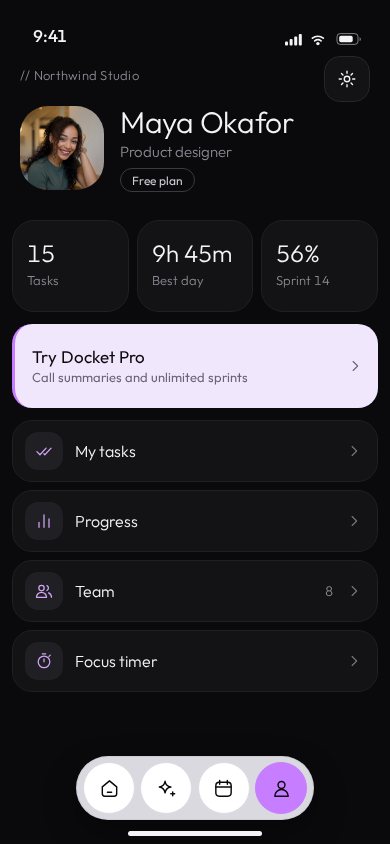
Docket is a complete team planner: welcome, sign in, a home with task progress and today's tasks, task lists and details, a sprint with checkbox rows, a board, a calendar, meetings with a timeline strip and a call screen, an AI helper that plans the day, a focus timer, progress stats, the team, a Pro plan, profile and settings. Near-black with one orchid purple, a lime dot, hatched bars and white sheets with lilac cards.
| Detail | Value |
|---|---|
| Screen type | Profile |
| App | Docket: Task and sprint planner |
| Category | Productivity |
| Design language | Dark-first, dark |
| Type | Outfit |
| Colours | #0a0a0c background, #17171a surface, #f5f3f8 text, #8b8a94 text-muted, #c77dff accent, #0a0a0c accent-contrast, #d6f24b secondary, #2a2a30 border, #ff7a7a danger |
What this screen says
- // Northwind Studio
- Maya Okafor
- Product designer
- Free plan
- 15Tasks
- 9h 45mBest day
- 56%Sprint 14
- Try Docket ProCall summaries and unlimited sprints
- My tasks
- Progress
- Team
- Focus timer
Around it in Docket
More profile screens
- Unplug Profile: Screen time blocker
- Streak Profile: Small days, long chains
- Deskly Profile: Hybrid office booking
- Pomo Profile: Focus timer
- Postbox Accounts: Email for busy teams
- Daybook Profile: Calendar and planner
- Scanly Profile: Document scanner
- Keyring Profile: Password manager
- Rota Teammate: Shift scheduling for hourly teams
- Inkwell Profile: Daily journal
- Shortlist Profile: Job search and application tracker
- Parley Profile: Team messenger
Every productivity app profile screen
What makes a good profile screen
- Lead with identity. Photo, name and one line about the person at the top. It confirms whose profile this is.
- Show meaningful stats. Two to four numbers that matter in this app, like workouts, followers, books read or streak.
- Make editing obvious for the owner. An Edit profile button near the top, shown only on your own profile.
- Organise content with tabs. Posts, activity, saved or achievements as tabs keep a long profile tidy.
The full profile screen guide and every example
Remix Docket free: describe your own app and it is drawn in this design. Or get its files from $10: Figma, React Native, SwiftUI, Flutter and HTML.