Templates · Success and confirmation screens · Travel app · Detour
Detour Arrived screen
A success screen from Detour, a community driving navigation app template in a Playful style. Screen 14 of 25.
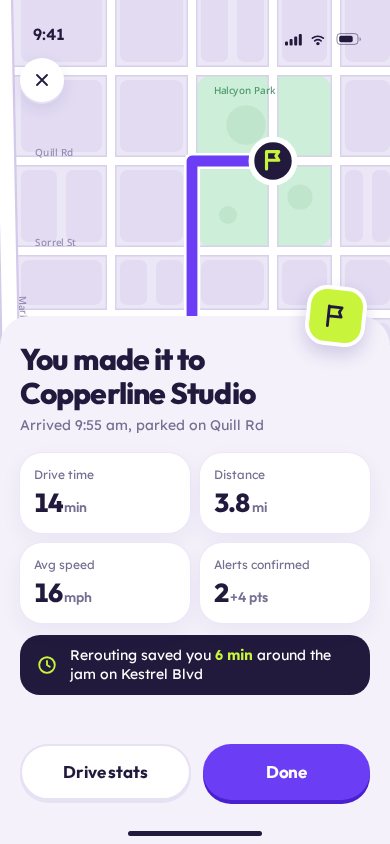
Detour is a complete community driving app: welcome, home and work setup, sign in, a live map with driver reports, search with categories, fuel prices and a station page, route options, a tilted turn by turn drive with a police alert, a report sheet, a hazard report and its thank you, arrival, sharing your ETA, planned drives with a leave by chart, driving stats, driver levels, an inbox, profile, car icons, voices, a Plus plan and settings. Lavender, grape and lime with a bright sticker colour for every kind of report.
| Detail | Value |
|---|---|
| Screen type | Success |
| App | Detour: Community driving navigation |
| Category | Travel |
| Design language | Playful, light |
| Type | Outfit for headings, Lexend for text |
| Colours | #f4f1fa background, #ffffff surface, #221a3d text, #776f92 text-muted, #6b3df5 accent, #ffffff accent-contrast, #c8f53c secondary, #e7e1f4 border, #ff5a4e danger |
What this screen says
- You made it to Copperline Studio
- Arrived 9:55 am, parked on Quill Rd
- Drive time 14min
- Distance 3.8mi
- Avg speed 16mph
- Alerts confirmed 2+4 pts
- Rerouting saved you 6 min around the jam on Kestrel Blvd
- Drive stats
- Done
Around it in Detour
More success and confirmation screens
- Tern Booked: Ferry and island hopping
- Berth Booked: Night trains and sleeper cabins
- Caravan Booked: Campervan rental and road trips
- Layover Lounge booked: Airport guide, gates and lounges
- Permit Submitted: Visas and travel documents wallet
- Backroad Booked: Road trip planner with stops
- Bunk Booked: Hostels and backpacker meetups
- Piazza Unlocked: Self-guided city walking tours
- Fjord Excursion booked: Cruise companion on board
- Atlas Arrived: Maps and navigation
- Kerb Session ended: Parking that reads like a road sign
- Linea Ticket ready: City transit
Every travel app success screen
What makes a good confirmation screen
- Confirm in the headline. "Payment sent", "Table booked for Friday at 8" or "Lesson complete" in plain words, with a clear success colour or icon.
- Repeat the key details. Amount, date, reference number or score, so people do not need to check elsewhere that the right thing happened.
- Say what happens next. When the order arrives, when the money lands, when the next lesson unlocks.
- Offer the next step. Track the order, add to calendar, share, or start the next lesson. One primary action and a way back home.
The full confirmation screen guide and every example
Remix Detour free: describe your own app and it is drawn in this design. Or get its files from $10: Figma, React Native, SwiftUI, Flutter and HTML.