Templates · Player, camera and editor screens · Food app · Curbside
Curbside Drops screen
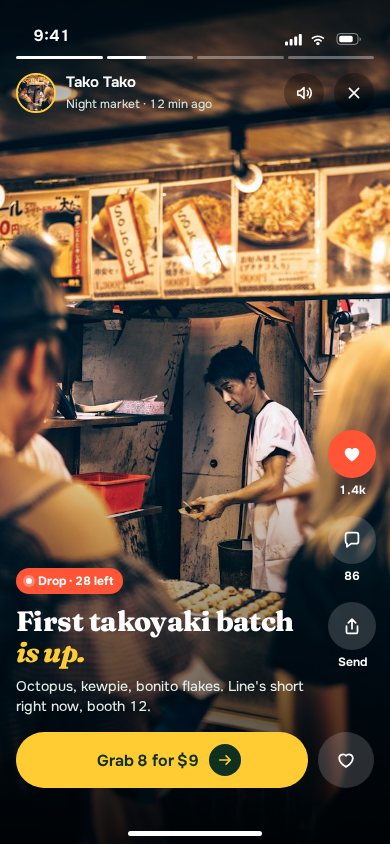
A media screen from Curbside, a food app template in a Gen Z style. Screen 19 of 25.
Curbside is a complete food truck app: welcome, cravings, sign in, a home with trucks parked near you, a live map, search, truck pages with menus and dishes, a cart, pickup checkout and an order ticket, live order status, following a truck on the move, reviews, a saved list, the weekly parking schedule, a night market, video drops, taste stats, order history, a Curbside Pass plan, notifications, profile and settings. Warm paper, pickle green and mustard, with pink striped awnings.
| Detail | Value |
|---|---|
| Screen type | Media |
| App | Curbside: Street food and food truck finder |
| Category | Food |
| Design language | Gen Z, light |
| Type | Fraunces for headings, Onest for text |
| Colours | #fff7ea background, #ffffff surface, #10301f text, #6f7d70 text-muted, #ffcc33 accent, #10301f accent-contrast, #ff8fb1 secondary, #efe4cf border, #ff5436 danger |
What this screen says
- Tako TakoNight market · 12 min ago
- 1.4k
- Send
- Drop · 28 left
- First takoyaki batch is up.
- Octopus, kewpie, bonito flakes. Line's short right now, booth 12.
- Grab 8 for $9
Around it in Curbside
More player, camera and editor screens
- Buns Scan receipt: Burger chain ordering and deals
- Crate Cook mode: Meal kits delivered weekly
- Menu Scan table: Scan, order and pay at the table
- Mart Scan and go: Supermarket app with loyalty and scan and go
- Lunchbox Snap the box: School lunch planner for parents
- Agave Mix: Cocktails and home bar
- Crock Jar photo: Fermentation and sourdough starter log
- Forage Cook mode: Farmers market and veg box
- Steep Lesson: Tea brewing and tasting notes
- Brigade Recipe: Restaurant kitchen and line ops
- Nibs Scanner: Food allergy and label scanner
- Ladle Cook mode: Recipes and meal planning
What makes a good media player screen
- Content takes the space. Artwork, video or the camera view should fill most of the screen.
- Primary controls in the thumb zone. Play and pause, the shutter or the main tool, large and low on the screen.
- Show progress and position. A scrubber with elapsed and remaining time, or the step in a lesson.
- Hide secondary controls until needed. Lyrics, queue, filters and advanced tools can live behind a tap or a swipe.
The full media player screen guide and every example
Remix Curbside free: describe your own app and it is drawn in this design. Or get its files from $10: Figma, React Native, SwiftUI, Flutter and HTML.