Templates · List and feed screens · Food app · Crumb
Crumb Menu screen
A list screen from Crumb, a neighbourhood bakery app template in a Neubrutalism style. Screen 5 of 25.
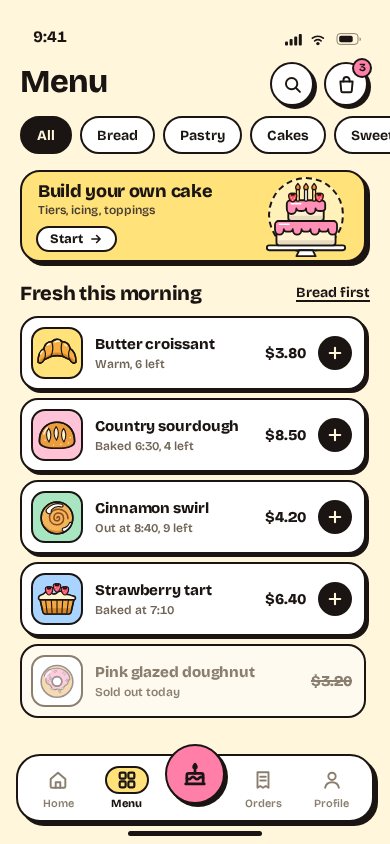
Crumb is a complete bakery app: welcome, sign in, a home with today's bakes fresh from the oven, the menu, search, a bake with sizes and extras, a custom cake builder with tiers, sponge, icing and toppings, preorders, basket, pickup slots, payment, live order tracking from oven to counter, past orders, a stamp card with rewards, a weekly bread club, bakeries nearby, your year in bakes, profile and settings. Butter yellow, strawberry pink and cream with thick black outlines.
| Detail | Value |
|---|---|
| Screen type | List |
| App | Crumb: Neighbourhood bakery |
| Category | Food |
| Design language | Neubrutalism, light |
| Type | Bricolage Grotesque |
| Colours | #fff6dc background, #ffffff surface, #1a1512 text, #6f6455 text-muted, #ff7fa8 accent, #1a1512 accent-contrast, #ffe27a secondary, #1a1512 border, #ff5a3c danger |
What this screen says
- Menu
- All Bread Pastry Cakes Sweet
- Build your own cake
- Tiers, icing, toppings
- Start
- Fresh this morningBread first
- Butter croissant
- Warm, 6 left
- Country sourdough
- Baked 6:30, 4 left
- Cinnamon swirl
- Out at 8:40, 9 left
- Strawberry tart
- Baked at 7:10
- Pink glazed doughnut
- Sold out today
- Home
- Orders
- Profile
Around it in Crumb
More list and feed screens
- Aisle Weekly shop: Shared grocery lists
- Menu: Scan, order and pay at the table
- Mart Weekly ad: Supermarket app with loyalty and scan and go
- Rescue Bakeries: Surprise bags of surplus food
- Omakase Reservations: Chef's counter reservations
- Lunchbox Week plan: School lunch planner for parents
- Agave Collection: Cocktails and home bar
- Crock Jars: Fermentation and sourdough starter log
- Curbside Reviews: Street food and food truck finder
- Forage In season: Farmers market and veg box
- Ember Cook log: Smoker and grill thermometer
- Steep Shelf: Tea brewing and tasting notes
What makes a good list screen
- Show what people need to decide. Each row should carry just enough to choose: a title, one or two details and a status. Everything else belongs on the detail screen.
- Keep rows consistent. The same information in the same place on every row lets people scan down a column instead of reading each item.
- Group with headings. Dates, categories or status headings break long lists into chunks people can skip through.
- Make common actions quick. Swipe actions, a checkbox or a heart on the row save opening the item for small tasks.
The full list screen guide and every example
Remix Crumb free: describe your own app and it is drawn in this design. Or get its files from $10: Figma, React Native, SwiftUI, Flutter and HTML.