Templates · List and feed screens · Food app · Steep
Steep Shelf screen
A list screen from Steep, a tea brewing and tasting notes app template in a Minimal style. Screen 5 of 25.
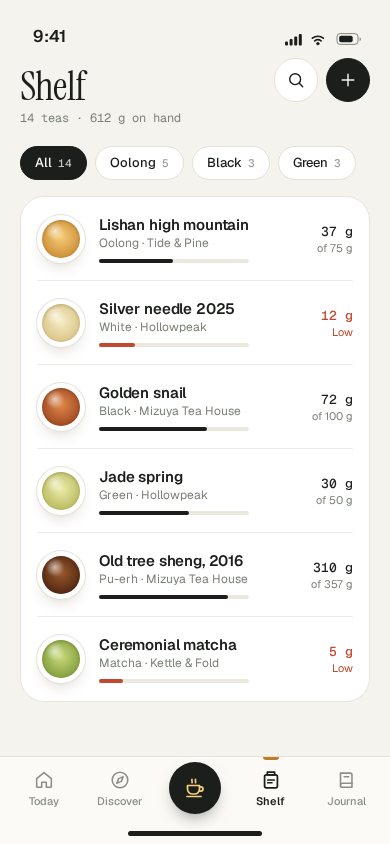
Steep is a complete tea app: welcome and brewing style, sign in, a today screen that picks up an unfinished session, a tea shelf with stock left, tea pages with an infusion plan, brew setup, a live infusion timer, tasting notes with aroma tags and sliders, a journal, session details with an infusion chart, discover, search, a tea shop with basket, checkout and confirmation, insights, a video lesson, adding a tea, a Plus plan, notifications, profile and settings. Porcelain white, ink and steeped amber, with every tea shown as its liquor colour.
| Detail | Value |
|---|---|
| Screen type | List |
| App | Steep: Tea brewing and tasting notes |
| Category | Food |
| Design language | Minimal, light |
| Type | Instrument Serif for headings, Geist for text |
| Colours | #f4f3ee background, #ffffff surface, #1b1e1b text, #7b8078 text-muted, #c07a2c accent, #ffffff accent-contrast, #a0601f secondary, #e8e5dc border, #c4472f danger |
What this screen says
- Shelf
- 14 teas · 612 g on hand
- All 14 Oolong 5 Black 3 Green 3
- Lishan high mountainOolong · Tide & Pine
- 37 gof 75 g
- Silver needle 2025White · Hollowpeak
- 12 gLow
- Golden snailBlack · Mizuya Tea House
- 72 gof 100 g
- Jade springGreen · Hollowpeak
- 30 gof 50 g
- Old tree sheng, 2016Pu-erh · Mizuya Tea House
- 310 gof 357 g
- Ceremonial matchaMatcha · Kettle & Fold
- 5 gLow
- Today
- Discover
- Journal
Around it in Steep
More list and feed screens
- Omakase Reservations: Chef's counter reservations
- Lunchbox Week plan: School lunch planner for parents
- Agave Collection: Cocktails and home bar
- Crock Jars: Fermentation and sourdough starter log
- Curbside Reviews: Street food and food truck finder
- Forage In season: Farmers market and veg box
- Ember Cook log: Smoker and grill thermometer
- Brigade Stations: Restaurant kitchen and line ops
- Nibs Swaps: Food allergy and label scanner
- Ladle Week plan: Recipes and meal planning
- Pantry Fruit and veg: Grocery delivery
- Brewly Menu: Coffee ordering and loyalty
What makes a good list screen
- Show what people need to decide. Each row should carry just enough to choose: a title, one or two details and a status. Everything else belongs on the detail screen.
- Keep rows consistent. The same information in the same place on every row lets people scan down a column instead of reading each item.
- Group with headings. Dates, categories or status headings break long lists into chunks people can skip through.
- Make common actions quick. Swipe actions, a checkbox or a heart on the row save opening the item for small tasks.
The full list screen guide and every example
Remix Steep free: describe your own app and it is drawn in this design. Or get its files from $10: Figma, React Native, SwiftUI, Flutter and HTML.